A VIN check and a vehicle history report are closely related, but they are not always the same thing. If you are buying a used car, understanding the difference can help you choose the right tool, read the results correctly, and avoid missing important warning signs.
In simple terms, a VIN check is the search process. You enter a vehicle identification number to look up available records tied to that specific vehicle. A vehicle history report is the result of that search. It organizes available records into sections such as title history, accident records, theft records, recalls, mileage, specifications, sale history, and other useful details.
Before you contact a seller, schedule a test drive, or send a deposit, start with a free VIN check. Then use the report to decide what to verify next.
Quick Answer
A VIN check is the act of looking up a vehicle by its 17-character VIN. A vehicle history report is the record summary that may be returned from that lookup. The VIN check helps you find available data, while the vehicle history report helps you understand the vehicle’s past.
For example, when you enter a VIN into a lookup tool, the tool may return a report showing vehicle specifications, title records, theft records, accident records, sale records, recalls, safety ratings, market value, ownership costs, and other available information.
What Is a VIN Check?
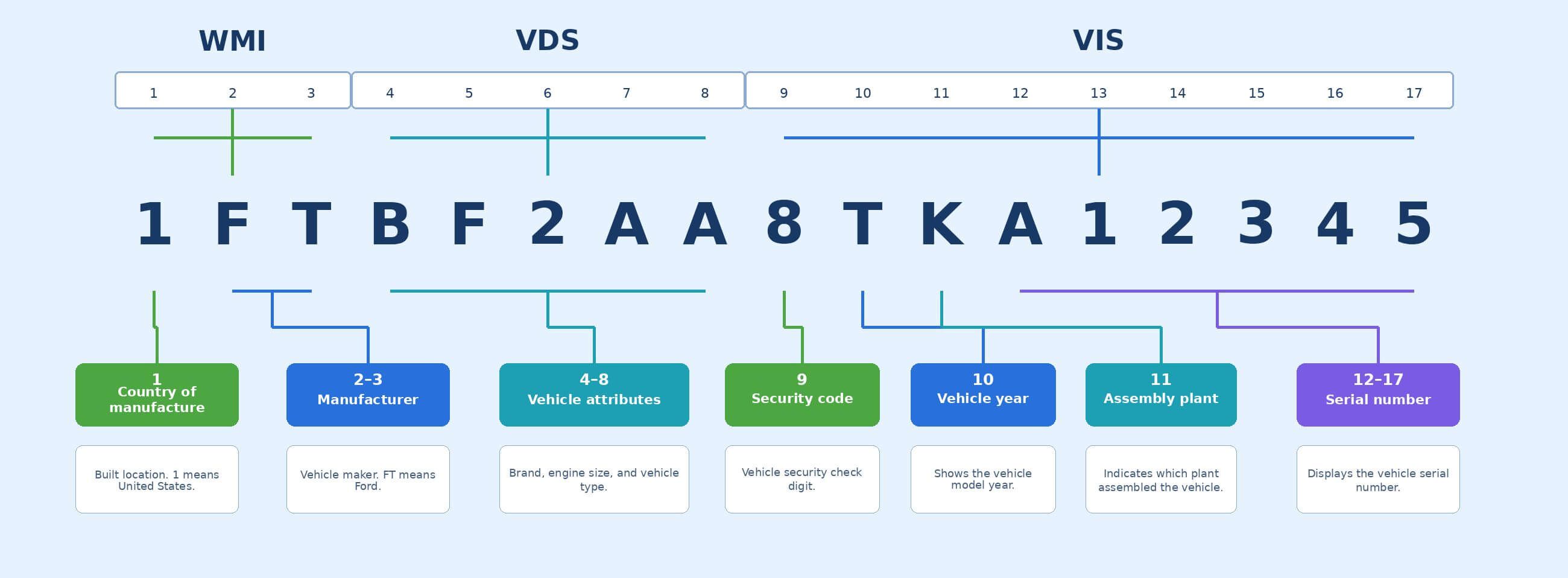
A VIN check is a search using a vehicle’s unique identification number. The VIN is usually 17 characters long and can be found on the dashboard near the windshield, the driver-side door jamb, the title, registration, insurance documents, and some service records.
A VIN check is useful because it helps connect the vehicle in front of you to available records. Instead of relying only on a seller’s description, you can verify whether the car’s recorded history supports the seller’s claims.
A VIN check may help you answer questions like:
- Does the VIN match the listed year, make, and model?
- Are there possible title brands?
- Is there theft history?
- Are there accident or damage records?
- Do mileage records look consistent?
- Are there open recall concerns?
- Does the vehicle’s history affect its market value?
A VIN check does not physically inspect the car. It searches available records. That means it is a strong first step, but it should still be followed by document review, seller questions, a test drive, and a pre-purchase inspection when needed.
What Is a Vehicle History Report?
A vehicle history report is the organized report you receive after running a VIN lookup. It may include multiple record categories depending on what data is available for that specific vehicle.
A report may include:
- Vehicle specifications
- Title records
- Junk, salvage, and insurance records
- Theft records
- Accident records
- Sale records
- Recall and defect information
- Equipment details
- Fuel efficiency information
- Safety ratings
- Current warranty details
- Market value
- Ownership cost
- Owner reviews or comparison data, when available
Not every report will contain every section. Some vehicles have more available data than others. A newer car, a frequently serviced car, or a car that has passed through auctions or insurance claims may have more records than a vehicle with limited public data.
If you are new to reports, it helps to review a guide on how to read a vehicle history report so you know which sections matter most before buying.
VIN Check vs Vehicle History Report: Main Difference
The easiest way to understand the difference is this: the VIN check is the lookup, while the vehicle history report is the output.
| Item | VIN Check | Vehicle History Report |
|---|---|---|
| What it is | The search process using a VIN | The organized results from that search |
| Main purpose | Find records tied to a vehicle | Help buyers understand those records |
| Best used for | Early screening and verification | Detailed review before purchase |
| Input needed | VIN | VIN-generated data |
| Limitation | Depends on correct VIN and available data | May not include every event in the vehicle’s life |
Both are useful. A VIN check helps you access information. A vehicle history report helps you interpret that information.
When Should You Run a VIN Check?
Run a VIN check as early as possible in the used car buying process. Ideally, do it before you meet the seller or pay for an inspection.
You should run a VIN check when:
- You find a used car online
- A seller gives you the VIN
- The listing details seem incomplete
- The price seems unusually low
- The seller claims the car has a clean title
- You want to confirm the trim or specifications
- You are comparing two similar vehicles
- You want to check for title, accident, mileage, recall, or theft clues
If the seller refuses to provide the VIN, treat that as a warning sign. A serious seller should usually be willing to share the VIN so a buyer can verify the car before purchase.
When Should You Review the Full Vehicle History Report?
Review the full report before you make an offer, schedule a mechanic inspection, or finalize the purchase.
Do not stop after seeing the year, make, and model. Read the full report carefully. A vehicle may match the seller’s listing but still have title brands, accident records, odometer concerns, open recalls, or sale history that affects its value.
Pay close attention to:
- Title brands
- Mileage consistency
- Accident or damage records
- Theft records
- Recall information
- Sale or auction records
- Market value
- Ownership cost
- Vehicle specifications
If the report shows a possible title issue, use a more focused title check by VIN before buying.
What a VIN Check Can Tell You
A VIN check can help verify the vehicle’s identity and uncover available records. It can be especially useful when a seller’s listing is vague or when a car seems too good to be true.
For example, a VIN check may show that the car’s trim, engine, or drivetrain is different from the listing. It may also reveal a title brand, theft record, accident record, or mileage pattern that deserves more review.
This is why a VIN check is useful even if you trust the seller. It gives you a second source of information before you spend money.
What a Vehicle History Report Can Tell You
A vehicle history report gives context. It does not just confirm identity; it helps you understand the vehicle’s recorded past.
For example, a report might show that a car had a salvage title years ago, was later rebuilt, appeared at auction, and now has a much lower market value than a clean-title version of the same model. Another report might show consistent mileage, no major title issues, and no open recall concerns.
That difference matters. Two cars with the same year, make, model, and mileage can have very different risk levels depending on their history.
What Neither One Can Guarantee
A VIN check and a vehicle history report are helpful, but they are not perfect. They rely on available records. If an accident was never reported, a repair was paid for privately, or maintenance was done at home, it may not appear in the data.
Neither a VIN check nor a vehicle history report can guarantee:
- The car was never in an accident
- The vehicle has no hidden mechanical problems
- Every repair was reported
- The seller is being honest
- The car has no flood exposure
- The current condition is good
- The title transfer will be smooth
That is why you should compare the report with the title, registration, seller documents, inspection results, and the vehicle’s physical condition.
How to Use Both Before Buying
Use the VIN check and vehicle history report together as part of a simple buying workflow.
1. Get the VIN From the Seller
Ask the seller for the VIN before you visit the vehicle. Compare it with the VIN shown in the listing and photos, if available.
2. Run the VIN Check
Use the VIN to look up available vehicle records. Confirm that the basic vehicle identity matches the seller’s description.
3. Read the Vehicle History Report
Review the report sections carefully. Look for title brands, accident history, theft records, mileage patterns, recalls, sale records, and value clues.
4. Compare the Report With the Vehicle
When you inspect the car, confirm that the VIN on the dashboard, door jamb, title, and registration all match. Look for signs that support or contradict the report.
5. Verify Recalls
Before buying, run a VIN recall check to confirm whether the vehicle has open safety recalls. Recall status can change, so check close to the purchase date.
6. Use the Report During Negotiation
If the report shows damage, title concerns, inconsistent mileage, or unresolved recalls, the price should reflect that risk. You can also use a car value by VIN check to compare the asking price with the vehicle’s history and condition.
Common Mistakes Buyers Make
Many used car buyers run a VIN check but do not read the full report. Others see a clean result and assume the vehicle is perfect. Both approaches are risky.
Avoid these mistakes:
- Checking only the basic vehicle specs
- Ignoring title brands
- Skipping mileage review
- Overlooking recall information
- Failing to compare the VIN across documents
- Trusting a clean report without inspecting the car
- Forgetting to verify lien or ownership issues
- Paying before reviewing the title
A report is most useful when you treat it as a decision tool, not just a formality.
VIN Check vs Vehicle History Report: Which One Do You Need?
For most used car buyers, the answer is both.
You need a VIN check to start the lookup and confirm that records exist for the vehicle. You need a vehicle history report to understand what those records mean.
If you are only browsing, a quick VIN check may be enough to screen out obvious risks. If you are ready to buy, read the full report, verify the title, inspect the car, and ask the seller direct questions.
Bottom Line
A VIN check and a vehicle history report work together, but they are not identical. The VIN check is the search. The vehicle history report is the organized result that helps you understand the car’s recorded past.
Before buying a used car, use the VIN check to verify the vehicle and use the report to evaluate risk. Then compare the findings with the title, seller documents, recall status, mileage, condition, and inspection results.
A used car may look good in photos, but its history can change the decision. Start with the VIN, read the report, and verify the details before you buy.
FAQs
Is a VIN check the same as a vehicle history report?
No. A VIN check is the lookup process using the vehicle identification number. A vehicle history report is the organized set of results that may come from that lookup.
What does a VIN check show?
A VIN check may show vehicle specifications, title records, accident history, theft records, mileage patterns, recall information, sale records, and other available vehicle details.
What does a vehicle history report show?
A vehicle history report may show title history, junk or salvage records, theft records, accident records, sale records, recalls, market value, ownership costs, specifications, safety information, and other available records.
Can a vehicle history report miss accidents?
Yes. Some accidents are not reported to insurance, police, repair networks, or other data sources. Always inspect the vehicle and consider a pre-purchase inspection before buying.
Should I run a VIN check before visiting a used car?
Yes. Running a VIN check before visiting can help you avoid wasting time on vehicles with title problems, mileage concerns, theft records, or other red flags.
{
  "@context": "https://schema.org",
  "@type": "FAQPage",
  "mainEntity": [
    {
      "@type": "Question",
      "name": "Is a VIN check the same as a vehicle history report?",
      "acceptedAnswer": {
        "@type": "Answer",
        "text": "No. A VIN check is the lookup process using the vehicle identification number. A vehicle history report is the organized set of results that may come from that lookup."
      }
    },
    {
      "@type": "Question",
      "name": "What does a VIN check show?",
      "acceptedAnswer": {
        "@type": "Answer",
        "text": "A VIN check may show vehicle specifications, title records, accident history, theft records, mileage patterns, recall information, sale records, and other available vehicle details."
      }
    },
    {
      "@type": "Question",
      "name": "What does a vehicle history report show?",
      "acceptedAnswer": {
        "@type": "Answer",
        "text": "A vehicle history report may show title history, junk or salvage records, theft records, accident records, sale records, recalls, market value, ownership costs, specifications, safety information, and other available records."
      }
    },
    {
      "@type": "Question",
      "name": "Can a vehicle history report miss accidents?",
      "acceptedAnswer": {
        "@type": "Answer",
        "text": "Yes. Some accidents are not reported to insurance, police, repair networks, or other data sources. Always inspect the vehicle and consider a pre-purchase inspection before buying."
      }
    },
    {
      "@type": "Question",
      "name": "Should I run a VIN check before visiting a used car?",
      "acceptedAnswer": {
        "@type": "Answer",
        "text": "Yes. Running a VIN check before visiting can help you avoid wasting time on vehicles with title problems, mileage concerns, theft records, or other red flags."
      }
    }
  ]
}
Author
Graham Sutton
Graham Sutton is an automotive information writer covering VIN lookup tools, title status research, vehicle condition history, and resale-value risk factors. He creates detailed guides that help readers compare listings more effectively, identify hidden problems, and use vehicle history data to make safer buying decisions. His work is especially useful for shoppers who want a clearer picture of a vehicle before negotiating price.