
Free Florida License Plate Lookup
Enter a Florida license plate number to search for the associated VIN and review available vehicle specifications, title records, theft, salvage, flood, mileage, recalls, sales, value, and other history.
It uses the plate number and Florida as the issuing state to identify the associated VIN when matching data is available. The VIN then becomes the basis for the vehicle report.
Check a Florida Plate
Enter the plate number exactly as shown and select Florida.
Plate-to-VIN matching and report contents vary by plate, VIN availability, reporting history, and source coverage. Confirm the VIN on the vehicle and official documents.
On This Page
- What a Florida Plate Lookup Is
- How the Lookup Works
- What the Report May Show
- Plate Lookup vs VIN vs FLHSMV
- Latest Verified Florida Statistics
- Plate and Temporary Tag Rules
- Title, Insurance and Liens
- Flood and Fraud Risks
- Florida Theft Risk
- Owner Privacy and Official Records
- Plate and VIN Red Flags
- Florida Used-Car Checklist
- Official Florida Resources
- Other State Plate Lookups
- Related Vehicle Tools
- Report Limitations
- Frequently Asked Questions
- Run a Free Plate Lookup
What Is a Florida License Plate Lookup?
A Florida license plate lookup is a plate-to-VIN search. You enter the plate number and choose Florida as the issuing state. When a matching VIN is available, that VIN is used to retrieve available vehicle identity and history information.
This is useful when an online listing, seller photo, auction post, or parked vehicle shows the Florida plate but does not clearly display the VIN. The lookup can help confirm whether the plate appears to match the advertised year, make, model, body style, and vehicle type.
A consumer plate lookup is not the same as an official FLHSMV registration or title inquiry. It does not prove who owns the vehicle, whether registration is current, or whether a title transfer or lien release has been completed.
How to Run a Free Florida License Plate Check
Enter the Plate
Type the Florida plate number exactly as shown on the vehicle, listing, or seller photo.
Select Florida
The issuing state matters because identical plate combinations can exist in different states.
Match the VIN
The system attempts to identify the VIN associated with the plate from available records.
Review and Verify
Compare the returned VIN and vehicle details with the dashboard, door label, title, registration, and seller paperwork.
No result does not mean the vehicle is safe or problem-free. Ask the seller for the VIN and run a direct VIN check when a plate-to-VIN match is unavailable.
What a Florida Plate Lookup Report May Show
Vehicle Identity
Associated VIN, model year, make, model, body, engine, drivetrain, colors, and other decoded specifications.
Title and Brand Records
Available title states, issue dates, salvage, rebuilt, flood, junk, lemon, or other brand records.
Theft and Salvage Signals
Available stolen-vehicle, recovery, junk, salvage, total-loss, and insurance-related records.
Mileage and Sales
Reported odometer entries, mileage inconsistencies, sales, listings, auction activity, and value information.
| Report Section | What It May Include | How to Use It |
|---|---|---|
| VIN and Specifications | Year, make, model, trim, engine, transmission, drivetrain, body style, fuel type, colors, and factory details. | Confirm that the plate result matches the advertised vehicle. |
| Title and Brand History | Reported title states, title dates, salvage, rebuilt, flood, junk, lemon, or other brands. | Investigate title changes, state transfers, and branding before paying. |
| Theft and Recovery | Available stolen-vehicle and recovery records tied to the VIN. | Verify the seller, physical VIN, title, and law-enforcement status when concerns appear. |
| Junk, Salvage and Total Loss | Records from insurers, recyclers, junk yards, salvage yards, or auctions. | Assess prior damage, flood exposure, repair risk, value, insurance, and registration concerns. |
| Odometer and Sales | Mileage readings, sale dates, listing history, auction activity, and price information. | Compare mileage and the seller’s story against the available timeline. |
| Recalls, Value and Warranty | Open recalls, estimated market value, warranty information, safety ratings, and ownership-cost context. | Plan safety repairs, negotiation, insurance, and ownership costs. |
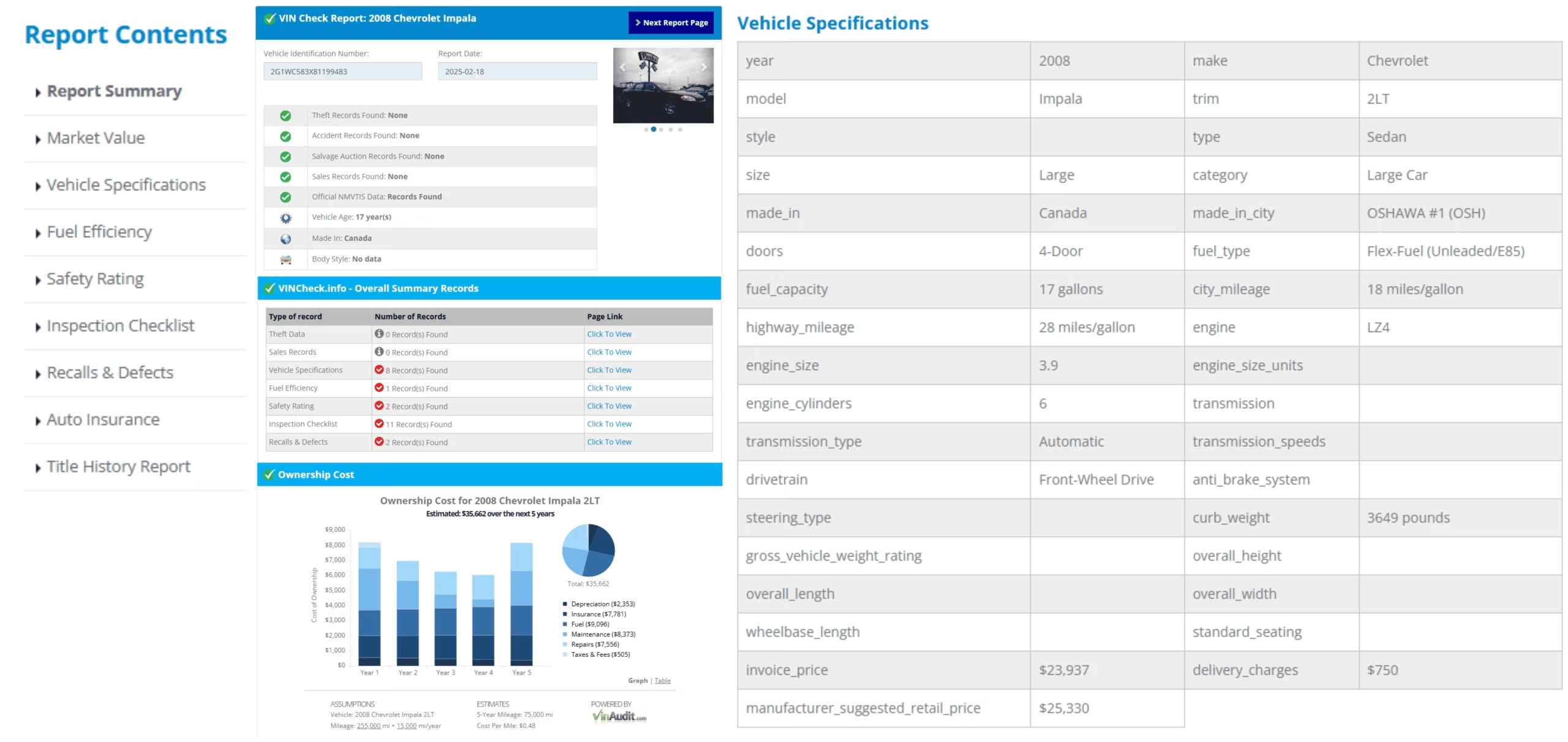
Sample report layout. Available sections vary by vehicle, VIN, reporting history, and source coverage.
Florida Plate Lookup, VIN Check, and Official FLHSMV Records
| Search Type | Best Used For | What It Does Not Confirm |
|---|---|---|
| Florida License Plate Lookup | Finding the associated VIN and beginning vehicle-history research when the VIN is not shown. | Current owner identity, official registration validity, or completed title transfer. |
| Direct VIN Check | Researching the exact vehicle after confirming the 17-character VIN on the vehicle and documents. | Every unreported accident, repair, lien, mechanical problem, or ownership dispute. |
| FLHSMV Motor Vehicle Check | Checking an official Florida record by VIN or title number, including title issue date, registration expiration, and listed lienholder information when available. | A complete vehicle condition or accident history. |
Use the official FLHSMV Motor Vehicle Check when you need state-record information tied to a VIN or Florida title number. Use the consumer plate lookup when the plate is your starting point and the VIN is not yet known.
Latest Verified Florida Vehicle Registration and Theft Statistics
The most recent FLHSMV current-registration report verified for this update was refreshed May 3, 2026. It provides monthly counts by county and vehicle type. For a standardized statewide total, FHWA’s January 2026 Table MV-1 reports 19,696,080 registered motor vehicles in Florida for calendar year 2024. NICB reported 27,142 Florida vehicle thefts in 2025, fourth among states and 29% lower than in 2024.
| Florida Measure | Latest Verified Figure | Source Context |
|---|---|---|
| Current registration dataset | Refreshed May 3, 2026 | FLHSMV monthly report organized by county and vehicle type |
| All registered motor vehicles | 19,696,080 | FHWA 2024 standardized statewide total, published January 2026 |
| Automobiles | 7,210,114 | FHWA automobile total, including publicly owned vehicles |
| Trucks | 11,794,134 | FHWA truck total, including publicly owned vehicles |
| Motorcycles | 634,364 | FHWA motorcycle total, including publicly owned vehicles |
| Vehicle thefts statewide | 27,142 | NICB 2025 total, fourth-highest among states |
| Year-over-year theft change | 29% decrease | NICB 2025 compared with 2024 |
Sources: FLHSMV Current Registered Vehicles, refreshed May 3, 2026; FHWA Highway Statistics 2024, Table MV-1, published January 2026; and NICB 2025 vehicle-theft analysis.
Florida License Plate and Temporary Tag Rules
Florida Usually Issues One Plate
Florida generally issues one registration license plate for a vehicle unless a specific law requires two plates. The plate is normally displayed at the rear.
Plates Stay With the Owner
The plate and registration remain in the registered owner’s name. A seller does not give the plate to the buyer.
Ten-Year Plate Replacement
Standard Florida license plates are generally replaced at the end of their 10-year issuance period.
Three Standard Plate Options
Florida offers county-name plates in participating counties, “Sunshine State,” and “In God We Trust” standard designs.
Temporary Plates
Florida may issue temporary plates for 10, 30, or 90 days depending on the authorized use. Dealer deliveries commonly use 30-day tags.
Lost or Stolen Plates
Report and replace lost, stolen, damaged, or destroyed plates through an authorized motor vehicle service center.

Florida plate designs and serial formats vary across standard, specialty, personalized, commercial, motorcycle, and other plate classes.
Seller reminder: if the plate is not transferred to a replacement vehicle and insurance is discontinued, FLHSMV requires the plate to be surrendered to avoid possible financial-responsibility sanctions.
Florida Title Transfer, Insurance, Plate, and Lien Checks
Complete the Title Properly
The seller and buyer should complete the title assignment, sale date, price, odometer disclosure when required, and signatures. The seller should file the required Notice of Sale.
Do Not Transfer the Seller’s Plate
The seller keeps the Florida plate. An eligible plate may be transferred to another vehicle owned or co-owned by the same registrant.
Maintain Required Insurance
Florida generally requires at least $10,000 in Personal Injury Protection and $10,000 in Property Damage Liability while a passenger vehicle is registered.
Verify the Lien
Use the official FLHSMV Motor Vehicle Check and confirm any lien directly with the listed lender before paying the seller in full.
Out-of-State Vehicles
An out-of-state vehicle may require VIN verification and additional title documentation before Florida title and registration can be completed.
No General Annual Inspection
Florida does not currently require statewide periodic safety or emissions inspections for standard passenger vehicles, but rebuilt and certain out-of-state vehicles still require inspection or VIN verification.
Florida Flood-Damaged Vehicle and Fraud Risks
Flooding is one of Florida’s recurring hazards. A vehicle exposed to salt water or fresh water can be cleaned, moved, retitled, and resold while corrosion and electrical problems remain hidden.
Flood and Water Brands
Review title and brand history for flood, water damage, salvage, rebuilt, junk, or insurance total-loss records.
Physical Flood Clues
Look for musty odors, new carpeting, silt, corrosion, water lines, fogged lamps, damaged connectors, mold, and inconsistent upholstery.
Electrical and Safety Systems
Water can affect airbags, sensors, wiring, modules, brakes, bearings, hybrid batteries, and other systems long after the vehicle dries.
Title Fraud
Altered titles or false information may hide a damaging brand, prior state, odometer discrepancy, or ownership problem.
VIN Cloning
A stolen vehicle may carry a copied VIN, counterfeit VIN label, false plate, or fraudulent title from a similar legitimate vehicle.
Odometer Fraud
Compare the displayed mileage with title, registration, auction, service, inspection, and sale records.
A clean-looking vehicle and unbranded current title do not prove that the vehicle was never flooded, damaged, totaled, or repaired. Use a history report and an independent inspection.
Why Florida Buyers Should Check Theft and VIN Records
Florida recorded 27,142 vehicle thefts in 2025, placing fourth among states by theft volume. Florida also achieved a 29% year-over-year reduction, one of the ten largest percentage declines in the country.
The improvement is meaningful, but buyers should still verify the plate, VIN, title, seller, and theft status before paying, particularly when the price is unusually low or the vehicle has recently crossed state lines.
Match Every VIN
Compare the dashboard, door label, title, registration, insurance card, and report.
Check the Seller
The seller’s identity should match the title or be supported by valid dealer, agent, estate, lienholder, or power-of-attorney documents.
Inspect the VIN Plate
Look for repainting, loose rivets, damaged labels, inconsistent fonts, covered numbers, or mismatched factory specifications.
Florida License Plate Owner Lookup and Privacy
VinCheck.info’s Florida plate lookup is for vehicle research. It does not reveal a private owner’s name, home address, phone number, driver-license information, or other protected personal data.
FLHSMV states that personal information in Florida motor vehicle and driver records is blocked in accordance with the federal Driver’s Privacy Protection Act. Official records may be available only through authorized procedures and legally permitted uses.
Use the plate lookup to research the vehicle, not to identify, locate, contact, follow, or confront a private person.
Florida Plate and VIN Red Flags
- The plate lookup returns a different make, model, year, body style, or VIN than the vehicle shown.
- The seller refuses to provide the VIN, title, registration, identification, or lien-release documents.
- The dashboard VIN, door label, title, registration, and insurance documents do not match.
- The VIN plate appears repainted, loose, scratched, replaced, covered, or altered.
- The title contains a salvage, rebuilt, flood, junk, lemon, or odometer brand that was not disclosed.
- The seller proposes giving the Florida plate to the buyer instead of completing the proper title and registration process.
- A temporary plate is expired, altered, unreadable, assigned to a different vehicle, or unsupported by sale documents.
- The price is far below market value and the seller demands an immediate deposit or remote payment.
Stop the transaction when the vehicle identity, title, seller, plate, or VIN cannot be verified. Do not rely on screenshots or promises in place of official documents.
Florida Used-Car Checklist After a Plate Lookup
- Confirm the plate and issuing state. Recheck every character before searching.
- Match the returned VIN. Compare it with every VIN location and document.
- Decode the vehicle. Verify the year, make, model, engine, body, and factory identity.
- Review the title history. Check title states, dates, brands, salvage, junk, flood, and total-loss records.
- Check theft and odometer records. Investigate mismatches or unexplained changes.
- Confirm the seller and lien. Require a transferable title and valid lien release.
- Verify the plate handling. The seller should retain, transfer, or surrender the Florida plate through the correct process.
- Confirm insurance before registration. Avoid a gap that could trigger registration or driver-license consequences.
- Get an independent inspection. Focus on flood, corrosion, airbags, structure, electronics, and mechanical condition.
- Get the full price in writing. Include taxes, fees, financing, add-ons, shipping, and warranty terms.
Official Florida Vehicle and Plate Resources
FLHSMV Motor Vehicle Check
Search by VIN or Florida title number for available state title, registration-expiration, and lienholder information.
Florida License Plates and Registration
Review standard plates, specialty plates, temporary plates, replacement, surrender, and registration guidance.
FLHSMV Motor Vehicle Fraud
Review official guidance on odometer fraud, title fraud, and vehicle cloning.
FLHSMV Service Centers
Find an authorized office for title, registration, plate transfer, replacement, surrender, and temporary-tag services.
License Plate Lookup by State
Select another issuing state when the vehicle does not display a Florida plate. The issuing state must match the plate because the same letter and number combination can exist in several states.
What a Florida License Plate Lookup Cannot Confirm
- The identity, address, phone number, or contact information of a private owner
- Whether Florida registration is currently valid or every fee has been paid
- Whether a title transfer or lien release has been officially completed
- Every accident, repair, flood event, theft, sale, or maintenance record
- The vehicle’s current mechanical, structural, electrical, emissions, or safety condition
- Future insurability, financing approval, reliability, registration approval, or resale value
Use the plate lookup with the physical VIN, official title and registration documents, seller verification, FLHSMV records when needed, insurance confirmation, and an independent inspection.
Florida License Plate Lookup Frequently Asked Questions
What is a Florida license plate lookup?
A Florida license plate lookup uses the plate number and Florida as the issuing state to search for the associated VIN when matching data is available. The VIN is then used to return available vehicle identity and history information.
Is the Florida license plate lookup free?
The VinCheck.info lookup can be started without a fee or account. Results depend on plate-to-VIN matching and available source coverage.
Can I look up a Florida plate without knowing the VIN?
Yes. Enter the plate number and select Florida. If the plate can be matched to a VIN, the tool can continue with VIN-based vehicle research.
What can a free Florida license plate check show?
Depending on available data, it may show the associated VIN, decoded specifications, title and brand records, theft or salvage signals, odometer information, sales, recalls, market value, warranty, and other vehicle-history details.
Can a Florida license plate lookup show the owner’s name or address?
No. VinCheck.info does not display protected owner names, home addresses, phone numbers, driver-license details, or other restricted personal information.
How can I check an official Florida title, registration date, or lienholder?
FLHSMV provides an official Motor Vehicle Check using the title number or VIN. That service may show when the title was issued, when registration is due to expire, and the lienholder shown in the state record.
Is a plate search the same as an official FLHSMV registration lookup?
No. A consumer plate search may identify the VIN and available vehicle history. An official state record or title inquiry is handled through FLHSMV and may require the VIN, title number, identification, fees, or a legally permitted use.
What should I do if the plate lookup returns the wrong vehicle?
Stop the transaction and verify the plate, issuing state, physical VIN, title, registration, and seller information. A mismatch can result from a typo, plate transfer, stale data, reassignment, or fraud.
What should I do if no VIN is found?
Check the plate for errors and confirm that Florida is selected. If no match is available, ask the seller for the VIN and run a direct VIN check.
Does a Florida license plate stay with the vehicle after a sale?
No. Florida plates remain in the name of the registered owner. The seller may transfer an eligible plate to another vehicle owned or co-owned by that person, or must surrender it when it is not transferred and insurance is discontinued.
Can a Florida plate be given to another person?
No. FLHSMV states that a license plate cannot be given or transferred to another person. A personalized plate may be transferred only to a vehicle owned or co-owned by the plate owner.
How long are Florida temporary tags valid?
Florida temporary plates may be issued for 10, 30, or 90 days depending on the legal purpose. Dealer deliveries commonly use 30-day temporary plates, and private sales may also qualify for a 30-day temporary plate.
What insurance is generally required for a Florida-registered passenger vehicle?
Florida generally requires at least $10,000 in Personal Injury Protection and $10,000 in Property Damage Liability while the vehicle is registered. Other coverage requirements can apply after crashes, violations, or for certain vehicles and drivers.
Why should Florida buyers check flood and title records?
Flooding is a recurring Florida hazard. A vehicle may be cleaned, moved, retitled, or sold after water exposure. Review title brands, salvage and insurance records, service history, corrosion, electronics, odors, and an independent inspection.
Why should Florida buyers check theft records?
Florida recorded 27,142 vehicle thefts in 2025, the fourth-highest state total. Although that represented a 29% decrease from 2024, buyers should still verify the VIN, title, seller, and theft status.
Does Florida require annual safety or emissions inspections?
Florida does not currently require statewide periodic safety or emissions inspections for standard passenger vehicles. Certain transactions, including some out-of-state title applications and rebuilt vehicles, still require VIN verification or inspection.
Does a license plate report replace an inspection or official records?
No. Plate-to-VIN matching and vehicle reports depend on available data. Verify the title, registration, lien status, seller, insurance, and recalls, and obtain an independent inspection before buying.
Check the Florida Plate Before You Buy
Search the plate, confirm the associated VIN, and compare the report with the title, registration, seller documents, insurance, and physical vehicle.
Run a Free Florida Plate LookupVinCheck.info is an independent vehicle information website and is not affiliated with or operated by the Florida Department of Highway Safety and Motor Vehicles. A Florida license plate lookup is a vehicle-research tool, not an official registration, title, lien, owner-record, insurance, or inspection service. Results vary by plate, VIN availability, reporting history, and source coverage. Confirm important details with FLHSMV, the seller, the lienholder, official documents, and an independent inspector.