
Free California License Plate Lookup
Enter a California license plate number to search for the associated VIN and review available vehicle specifications, title records, theft, salvage, mileage, recalls, sales, value, and other history.
It uses the plate number and California as the issuing state to identify the associated VIN when matching data is available. The VIN then becomes the basis for the vehicle report.
Check a California Plate
Enter the plate number exactly as shown and select California.
Plate-to-VIN matching and report contents vary by plate, VIN availability, reporting history, and source coverage. Confirm the VIN on the vehicle and official documents.
On This Page
- What a California Plate Lookup Is
- How the Lookup Works
- What the Report May Show
- Plate Lookup vs VIN vs DMV Record
- Latest California Statistics
- California Plate Rules
- Title Transfer and Smog Rules
- California Theft Risks
- Owner Privacy and Official Records
- Plate and VIN Red Flags
- California Used-Car Checklist
- Other State Plate Lookups
- Report Limitations
- Frequently Asked Questions
What Is a California License Plate Lookup?
A California license plate lookup is a plate-to-VIN search. You enter the plate number and choose California as the issuing state. When a matching VIN is available, that VIN is used to retrieve available vehicle identity and history information.
This is useful when an online listing, seller photo, auction post, or parked vehicle shows the California plate but does not clearly display the VIN. The lookup can help confirm whether the plate appears to match the advertised year, make, model, body style, and vehicle type.
A consumer plate lookup is not the same as an official California DMV registration inquiry. It does not prove who owns the vehicle, whether registration is current, or whether a title transfer or lien release has been completed.
How to Run a Free California License Plate Check
Enter the Plate
Type the California plate number exactly as shown on the vehicle, listing, or seller photo.
Select California
The issuing state matters because identical plate combinations can exist in different states.
Match the VIN
The system attempts to identify the VIN associated with the plate from available records.
Review and Verify
Compare the returned VIN and vehicle details with the dashboard, door label, title, registration, and seller paperwork.
No result does not mean the vehicle is safe or problem-free. Ask the seller for the VIN and run a direct VIN check when a plate-to-VIN match is unavailable.
What a California Plate Lookup Report May Show
Vehicle Identity
Associated VIN, model year, make, model, body, engine, drivetrain, colors, and other decoded specifications.
Title and Brand Records
Available title states, issue dates, salvage, rebuilt, flood, junk, or other brand records.
Theft and Salvage Signals
Available stolen-vehicle, recovery, junk, salvage, total-loss, and insurance-related records.
Mileage and Sales
Reported odometer entries, mileage inconsistencies, sales, listings, auction activity, and value information.
| Report Section | What It May Include | How to Use It |
|---|---|---|
| VIN and Specifications | Year, make, model, trim, engine, transmission, drivetrain, body style, fuel type, colors, and factory details. | Confirm that the plate result matches the advertised vehicle. |
| Title and Brand History | Reported title states, title dates, salvage, rebuilt, flood, junk, or other brands. | Investigate title changes, state transfers, and branding before paying. |
| Theft and Recovery | Available stolen-vehicle and recovery records tied to the VIN. | Verify the seller, physical VIN, title, and law-enforcement status when concerns appear. |
| Junk, Salvage and Total Loss | Records from insurers, recyclers, junk yards, salvage yards, or auctions. | Assess prior damage, repair risk, value, insurance, and registration concerns. |
| Odometer and Sales | Mileage readings, sale dates, listing history, auction activity, and price information. | Compare mileage and the seller’s story against the available timeline. |
| Recalls, Value and Warranty | Open recalls, estimated market value, warranty information, safety ratings, and ownership-cost context. | Plan safety repairs, negotiation, insurance, and ownership costs. |
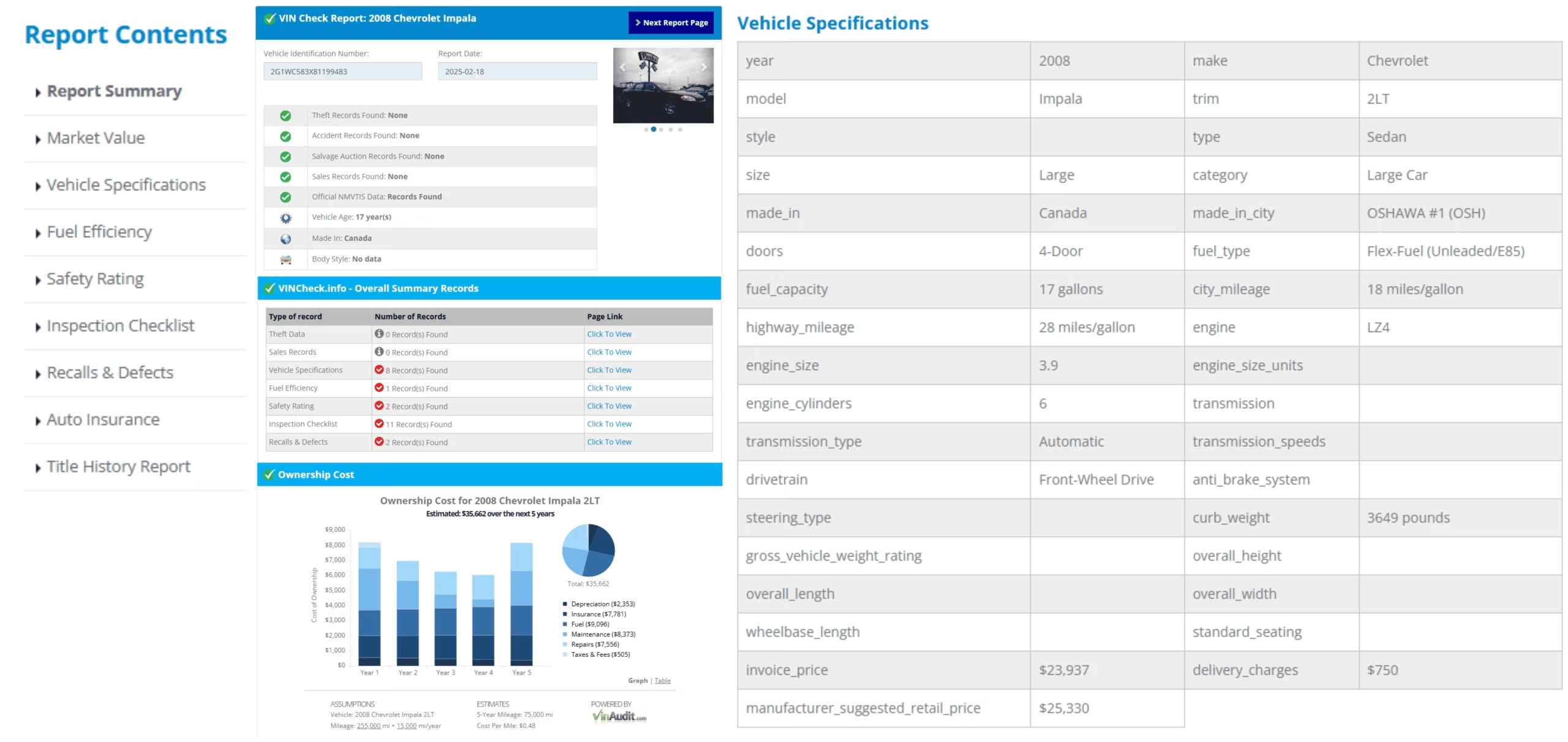
Sample report layout. Available sections vary by vehicle, VIN, reporting history, and source coverage.
California Plate Lookup, VIN Check, and Official DMV Records
| Search Type | Best Used For | What It Does Not Confirm |
|---|---|---|
| California License Plate Lookup | Finding the associated VIN and beginning vehicle-history research when the VIN is not shown. | Current owner identity, official registration validity, or completed title transfer. |
| Direct VIN Check | Researching the exact vehicle after confirming the 17-character VIN on the vehicle and documents. | Every unreported accident, repair, lien, mechanical problem, or ownership dispute. |
| California DMV Vehicle Record | Official registration information or records available through DMV procedures. | Access is not automatic; identification, documentation, fees, and a permissible purpose may apply. |
California DMV’s online system allows a person to request their own vehicle registration record. Requests for another person’s record generally use Form INF 70 and are subject to privacy and permissible-use requirements.
Latest California Vehicle Registration and Theft Statistics
California DMV reported 36,190,654 registered vehicles as of January 1, 2026. NICB reported 136,988 vehicle thefts in California during 2025, the highest state total in the country.
| California Measure | Latest Figure | Source Context |
|---|---|---|
| Registered vehicles | 36,190,654 | California DMV total as of January 1, 2026 |
| Vehicle thefts statewide | 136,988 | NICB 2025 total, highest among states |
| Los Angeles metro thefts | 53,911 | NICB 2025 metropolitan-area total |
| San Francisco-Oakland metro thefts | 22,197 | NICB 2025 metropolitan-area total |
| Riverside-San Bernardino metro thefts | 14,111 | NICB 2025 metropolitan-area total |
| San Francisco-Oakland theft rate | 477.51 per 100,000 | Highest 2025 metro rate among areas with more than 1,000 thefts |
| Bakersfield-Delano theft rate | 477.27 per 100,000 | Second-highest 2025 metro rate among areas with more than 1,000 thefts |
Sources: California DMV statistics, updated January 1, 2026 and NICB 2025 vehicle theft analysis.
California License Plate Rules Buyers Should Know
Most Vehicles Use Two Plates
California generally issues two plates for passenger and most other vehicles. Motorcycles, trailers, certain special equipment, tow dollies, and specified truck tractors receive one plate.
Plates Usually Stay With the Vehicle
California DMV states that license plates generally remain with the vehicle when ownership changes.
Special Plates Have Extra Rules
Personalized and special interest plates may be retained, reassigned, released, or transferred only through the applicable DMV process.
Annual Registration Stickers
California registrations must be renewed, and current stickers must be displayed as required for the plate and vehicle type.
Temporary Registration
Dealers may issue temporary registration while permanent registration and plates are processed. Temporary documents should match the VIN and sale paperwork.
Replacement Plates
Lost, stolen, damaged, or illegible plates can be replaced through California DMV. A plate lookup does not replace that official process.
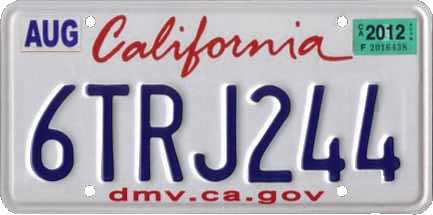
California issues standard, commercial, motorcycle, trailer, personalized, special interest, and other plate types.
California Title Transfer, Seller Notice, Odometer, and Smog Rules
Ten-Day Transfer Requirement
California DMV states that an ownership or lienholder change must be reported within 10 days and the title must be updated.
Seller’s Five-Day Notice
The seller must submit a Notice of Transfer and Release of Liability within 5 days. The notice does not replace the buyer’s title transfer.
Smog Certification
In a California sale, the seller generally must provide a valid smog certification when required. Certain newer vehicles and exempt transfers follow different rules.
Odometer Disclosure
The buyer and seller must complete the required odometer disclosure for covered transfers. Compare the stated mileage with the vehicle and available records.
A license plate is not proof of ownership. Confirm the seller’s name on the title or require valid documentation showing authority to sell the vehicle.
Why California Buyers Should Check Theft and VIN Records
California recorded 136,988 vehicle thefts in 2025, more than one-fifth of the U.S. total. Los Angeles-Long Beach-Anaheim had 53,911 thefts, while San Francisco-Oakland-Fremont had 22,197 and Riverside-San Bernardino-Ontario had 14,111.
NICB also reported the highest large-metro theft rates in San Francisco-Oakland-Fremont and Bakersfield-Delano, at approximately 477 thefts per 100,000 residents. Buyers should verify the plate, VIN, title, seller, and theft status before paying.
Match Every VIN
Compare the dashboard, door label, title, registration, insurance card, smog documents, and report.
Check the Seller
The seller’s identity should match the title or be supported by valid dealer, agent, estate, lienholder, or power-of-attorney documents.
Inspect the VIN Plate
Look for repainting, loose rivets, damaged labels, inconsistent fonts, covered numbers, or mismatched factory specifications.
California License Plate Owner Lookup and Privacy
VinCheck.info’s California plate lookup is for vehicle research. It does not reveal a private owner’s name, home address, phone number, driver-license information, or other protected personal data.
California DMV explains that confidential information such as addresses and Social Security numbers is not public record. Requests for another person’s driver or vehicle record must use the appropriate process and a permissible purpose.
California DMV may notify the person whose record was requested in some circumstances. Government and qualified commercial requesters may use separate requester-code procedures for legitimate business or governmental uses.
California Plate and VIN Red Flags
- The plate lookup returns a different make, model, year, body style, or VIN than the vehicle shown.
- The seller refuses to provide the VIN, title, registration, identification, smog certificate, or lien-release documents.
- The dashboard VIN, door label, title, registration, and smog records do not match.
- The VIN plate appears repainted, loose, scratched, replaced, covered, or altered.
- The title contains a salvage, junk, rebuilt, flood, lemon, or odometer brand that was not disclosed.
- The vehicle displays only one plate even though its vehicle type normally receives two.
- The title name does not match the seller and no valid authority to sell is provided.
- The price is far below market value and the seller demands an immediate deposit or remote payment.
Do not use a plate lookup to confront, follow, contact, or identify a private person. Use it only for lawful vehicle research and verification.
California Used-Car Checklist After a Plate Lookup
- Confirm the plate and issuing state. Recheck every character before searching.
- Match the returned VIN. Compare it with every VIN location and document.
- Decode the vehicle. Verify the year, make, model, engine, body, and factory identity.
- Review the title history. Check title states, dates, brands, salvage, junk, and total-loss records.
- Check theft and odometer records. Investigate mismatches or unexplained changes.
- Confirm the seller and lien. Require a transferable title and valid lien release.
- Verify the smog certificate. Confirm whether the vehicle and transfer require one and check the reported test history.
- Review the transfer deadlines. The buyer and seller have separate DMV reporting responsibilities.
- Get an independent inspection. A report cannot confirm current mechanical or structural condition.
- Get the full price in writing. Include taxes, fees, financing, add-ons, shipping, and warranty terms.
Official California Vehicle and Plate Resources
California DMV Title Transfers
Review private-sale, dealer, family, lienholder, and title-transfer requirements.
California DMV Vehicle Records
Request your own vehicle record or review the process for requesting another person’s record.
California DMV License Plates
Review standard, commercial, motorcycle, trailer, replacement, special interest, and personalized plates.
California DMV Smog Inspections
Review sale, registration, renewal, model-year, fuel-type, and transfer exemptions.
License Plate Lookup by State
Select another issuing state when the vehicle does not display a California plate. The issuing state must match the plate because the same letter and number combination can exist in several states.
What a California License Plate Lookup Cannot Confirm
- The identity, address, phone number, or contact information of a private owner
- Whether California registration is currently valid or every fee has been paid
- Whether a title transfer or lien release has been officially completed
- Every accident, repair, flood event, theft, sale, or maintenance record
- The vehicle’s current mechanical, structural, electrical, emissions, or safety condition
- Future insurability, financing approval, reliability, registration approval, or resale value
Use the plate lookup with the physical VIN, official title and registration documents, seller verification, DMV records when needed, smog documentation, and an independent inspection.
California License Plate Lookup Frequently Asked Questions
What is a California license plate lookup?
A California license plate lookup uses the plate number and California as the issuing state to search for the associated VIN when matching data is available. The VIN is then used to return available vehicle identity and history information.
Is the California license plate lookup free?
The VinCheck.info lookup can be started without a fee or account. Results depend on plate-to-VIN matching and available source coverage.
Can I look up a California plate without knowing the VIN?
Yes. Enter the plate number and select California. If the plate can be matched to a VIN, the tool can continue with VIN-based vehicle research.
What can a free California license plate check show?
Depending on available data, it may show the associated VIN, decoded specifications, title and brand records, theft or salvage signals, odometer information, sales, recalls, market value, warranty, and other vehicle-history details.
Can a California license plate lookup show the owner’s name or address?
No. VinCheck.info does not display protected owner names, home addresses, phone numbers, driver-license details, or other restricted personal information.
How can I request an official California vehicle record?
You may request your own vehicle registration record through California DMV’s online system. Requests for another person’s record generally use Form INF 70 and must meet DMV requirements, including a permissible purpose, identification, supporting information, and applicable fees.
Is a plate search the same as a California DMV registration lookup?
No. A consumer plate search may identify the VIN and available vehicle history. An official registration record is provided by California DMV and may require identification, documentation, fees, and a legally permitted use.
What should I do if the plate lookup returns the wrong vehicle?
Stop the transaction and verify the plate, issuing state, physical VIN, title, registration, and seller information. A mismatch can result from a typo, plate transfer, stale data, reassignment, or fraud.
What should I do if no VIN is found?
Check the plate for errors and confirm that California is selected. If no match is available, ask the seller for the VIN and run a direct VIN check.
Do California license plates stay with the vehicle when it is sold?
California DMV states that license plates generally remain with the vehicle. Personalized or special interest plates may be retained, reassigned, or transferred only under specific DMV procedures.
How quickly must a California vehicle transfer be reported?
California DMV states that ownership or lienholder changes must be reported within 10 days. Sellers must submit a Notice of Transfer and Release of Liability within 5 days.
Who is responsible for the smog certificate in a California private sale?
California DMV states that the seller generally must provide the buyer with a valid smog certification when required. Some vehicles and transfers are exempt.
How many license plates does a California vehicle need?
Most California vehicle types receive two plates. Motorcycles, trailers, certain special equipment, tow dollies, and specified truck tractors receive one plate.
Why should California buyers check theft records?
California recorded 136,988 vehicle thefts in 2025, the highest state total. Los Angeles, San Francisco-Oakland, and Riverside-San Bernardino were also among the metropolitan areas with the most thefts.
Does a license plate report replace an inspection or official records?
No. Plate-to-VIN matching and vehicle reports depend on available data. Verify the title, registration, lien status, seller, smog documentation, and recalls, and obtain an independent inspection before buying.
Check the California Plate Before You Buy
Search the plate, confirm the associated VIN, and compare the report with the title, registration, seller documents, smog records, and physical vehicle.
Run a Free California Plate LookupVinCheck.info is an independent vehicle information website and is not affiliated with or operated by the California Department of Motor Vehicles. A California license plate lookup is a vehicle-research tool, not an official registration, title, lien, owner-record, or smog-compliance service. Results vary by plate, VIN availability, reporting history, and source coverage. Confirm important details with California DMV, the seller, the lienholder, official documents, and an independent inspector.