
Free Arizona License Plate Lookup
Enter an Arizona license plate number to search for the associated VIN and review available vehicle specifications, title brands, theft, salvage, mileage, recalls, sales, value, and other history.
It uses the plate number and Arizona as the issuing state to identify an associated VIN when matching data is available. The VIN then becomes the basis for the vehicle report.
Check an Arizona Plate
Enter the plate number exactly as shown and select Arizona.
Plate-to-VIN matching and report contents vary by plate, VIN availability, reporting history, and source coverage. Confirm the VIN on the vehicle and official documents.
On This Page
- What an Arizona Plate Lookup Is
- How the Free Lookup Works
- What the Report May Show
- Plate Lookup vs VIN vs MVD
- Latest Arizona Statistics
- Plate Display and Plate Types
- Three-, 30-, and 90-Day Permits
- Plate Removal, Sold Notice and Transfer
- Title, Registration and Liens
- Phoenix and Tucson Emissions
- Salvage and Restored-Salvage Titles
- Theft, VIN Cloning and Fraud
- Arizona Auto Insurance
- Owner Privacy and Record Access
- Plate and VIN Red Flags
- Arizona Used-Car Checklist
- Official Arizona Resources
- Other State Plate Lookups
- Related Vehicle Tools
- Report Limitations
- Frequently Asked Questions
- Run a Free Arizona Plate Check
What Is an Arizona License Plate Lookup?
An Arizona license plate lookup is a plate-to-VIN search. Enter the complete plate number and select Arizona as the issuing state. When a matching VIN is available, that VIN is used to retrieve available vehicle identity and history information.
This is useful when a private-sale listing, dealer page, auction post, or vehicle photo shows the Arizona plate but not the VIN. The result can help you compare the advertised year, make, model, body style, and vehicle type with available records.
A consumer plate lookup does not prove current ownership, active registration, lien release, completed title transfer, emissions compliance, insurance coverage, or mechanical condition. Those questions require official records, original documents, and an inspection.
How to Run a Free Arizona License Plate Check
Enter the Plate
Type the Arizona plate number exactly as shown on the vehicle, listing, or seller photo.
Select Arizona
The issuing state matters because the same plate combination may exist in another state.
Match the VIN
The system attempts to identify the VIN associated with the plate from available records.
Review and Verify
Compare the returned VIN with the dashboard, door label, title, registration, and seller documents.
No result does not mean the vehicle is safe or problem-free. Ask for the VIN and run a direct VIN check when a plate-to-VIN match is unavailable.
What an Arizona Plate Lookup Report May Show
Vehicle Identity
Associated VIN, model year, make, model, body, engine, drivetrain, colors, and decoded specifications.
Title and Brand Records
Available title states, issue dates, salvage, restored salvage, flood, junk, lemon, or other brand records.
Theft and Damage Signals
Available stolen-vehicle, recovery, accident, junk, salvage, total-loss, and insurance-related records.
Mileage, Sales and Value
Reported odometer entries, mileage inconsistencies, sales, listings, auction activity, and value information.
| Report Section | What It May Include | How to Use It |
|---|---|---|
| VIN and Specifications | Year, make, model, trim, engine, transmission, drivetrain, body style, fuel type, colors, and factory details. | Confirm that the plate result matches the advertised vehicle. |
| Title and Brand History | Reported title states, title dates, salvage, restored salvage, flood, junk, lemon, or other brands. | Investigate branding and state transfers before paying. |
| Theft and Recovery | Available stolen-vehicle and recovery records tied to the VIN. | Verify the physical VIN, seller, title, and official theft status. |
| Accident, Junk and Salvage | Reported collisions, insurers, recyclers, junk yards, salvage yards, total losses, or auctions. | Assess repair quality, safety, value, and insurability. |
| Odometer and Sales | Mileage readings, sale dates, listing history, auction activity, and price information. | Compare mileage and the seller’s story against the available timeline. |
| Recalls, Value and Warranty | Open recalls, estimated market value, warranty information, safety ratings, and ownership-cost context. | Plan safety repairs, negotiation, insurance, and ownership costs. |
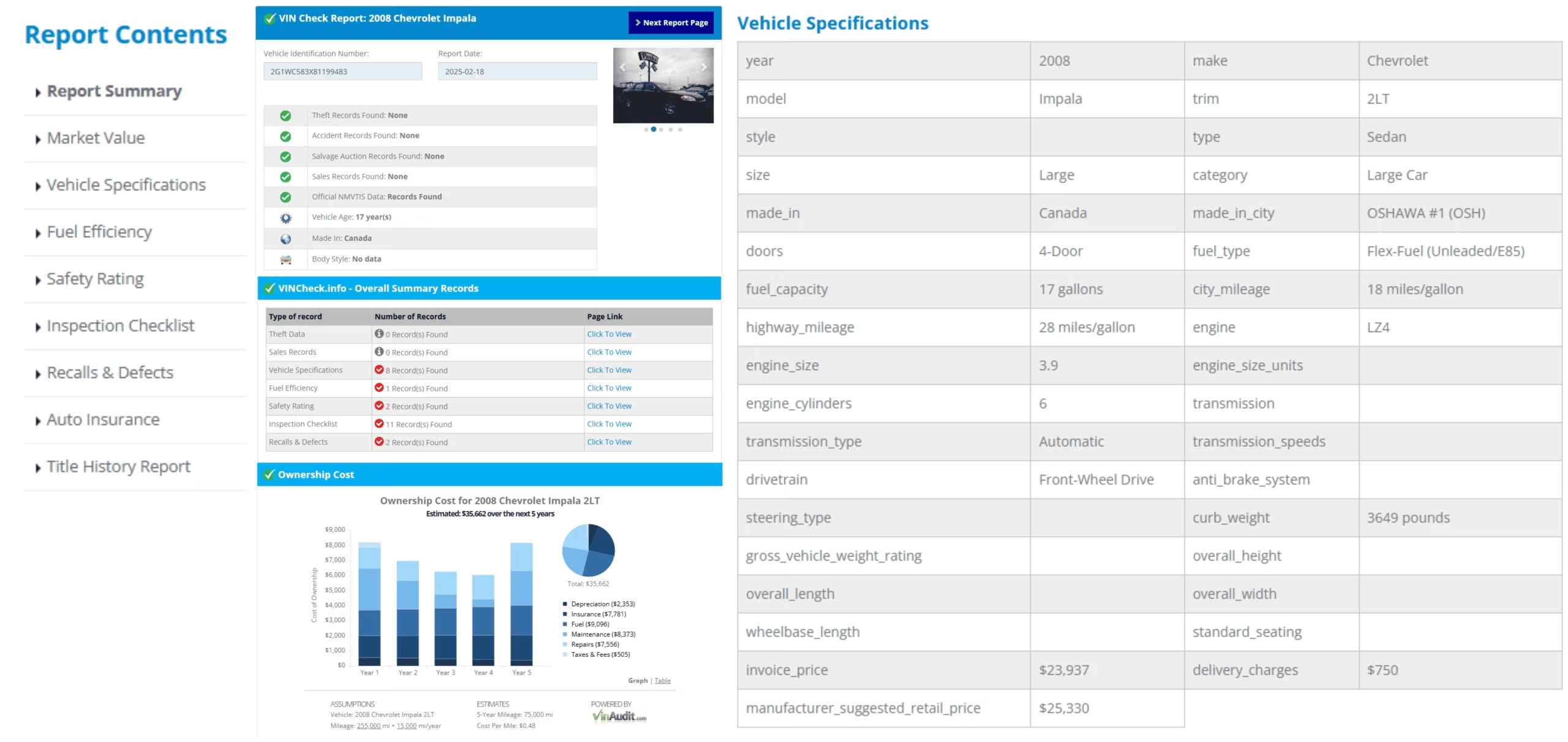
Sample report layout. Available sections vary by vehicle, VIN, reporting history, and source coverage.
Arizona Plate Lookup, VIN Check, and Official MVD Services
| Search Type | Best Used For | What It Does Not Confirm |
|---|---|---|
| Arizona License Plate Lookup | Finding an associated VIN and starting vehicle-history research when the VIN is not shown. | Current owner identity, official registration validity, or completed title transfer. |
| Direct VIN Check | Researching the exact vehicle after confirming the complete VIN on the vehicle and documents. | Every unreported accident, repair, lien, mechanical problem, or ownership dispute. |
| AZ MVD Now Title Status | Checking an Arizona title status using official state services. | A complete accident, auction, repair, or mechanical-condition history. |
| Lien Motor Vehicle Inquiry | Reviewing available Arizona lien information before completing a purchase. | That the balance is paid or the lender has released the lien unless independently confirmed. |
| Personalized Plate Search | Checking whether a requested plate configuration appears available through AZ MVD Now. | That the plate will be approved or issued. |
Latest Arizona Vehicle Registration and Theft Statistics
ADOT reports 8,323,237 vehicles registered in Arizona during fiscal year 2025. Arizona also recorded 12,686 vehicle thefts in calendar year 2025, a 25% decrease from 17,010 thefts in 2024.
| Arizona Measure | Latest Figure | Source Context |
|---|---|---|
| Registered vehicles | 8,323,237 | ADOT fiscal year 2025 fast facts |
| MVD customers served | 3.0 million | ADOT fiscal year 2025 fast facts |
| MVD transactions | 15 million | ADOT fiscal year 2025 fast facts |
| Vehicle thefts | 12,686 | Arizona Automobile Theft Authority calendar year 2025 total |
| Theft change from 2024 | 25% decrease | 17,010 thefts in 2024 versus 12,686 in 2025 |
Sources: ADOT Fast Facts and Arizona Automobile Theft Authority 2025 theft report.
Arizona License Plate Display Rules and Plate Types
Most Vehicles Use One Rear Plate
When one Arizona plate is issued, it is generally displayed at the rear of the vehicle.
Keep the Plate Clearly Visible
The plate must be securely attached, clearly visible, and maintained so that the identifying information remains readable.
Plates Are Assigned to the Owner
Arizona generally requires the registered owner to retain the plate when transferring the vehicle to another person.
More Than 100 Specialty Designs
Arizona offers standard, personalized, disability, military, university, charity, special-cause, and other specialty plates.
Personalized Availability Is Separate
Use AZ MVD Now to check a requested configuration. A consumer plate lookup does not reserve or approve a personalized plate.
Format Is Not Proof
A plausible serial format does not prove ownership, current registration, title status, or vehicle condition.
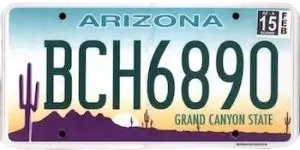
Arizona plate formats vary by design, issuance series, plate class, vehicle type, and personalization.
Official references: A.R.S. 28-2354 and ADOT License Plates and Placards.
Arizona Three-Day, 30-Day, and 90-Day Vehicle Permits
Restricted Use 3-Day Permit
Allows an unregistered vehicle to travel to emissions testing, inspection, title or registration services, or necessary repair. The fee is $1.
30-Day General Use Permit
Allows general operation for 30 days when permanent registration or another permit is unavailable. Only one is allowed per vehicle in 12 months. The fee is $15.
90-Day Resident Permit
Allows an Arizona resident to operate the vehicle while gathering incomplete title or registration documents. The fee is $15.
Dealer Temporary Registration
A licensed dealer may issue a temporary registration plate for a newly purchased vehicle while permanent registration is processed.
Private-Sale Registration Expires
Registration does not remain valid after the private seller transfers ownership. The buyer must register the vehicle or use an appropriate permit.
Temporary Plates May Not Match
Temporary and dealer plates may not produce a reliable plate-to-VIN result. Ask for the physical VIN and transaction documents.
Official reference: ADOT Vehicle Permits.
Arizona Plate Removal, Sold Notice, and Vehicle Transfer
Seller Removes the Plate
The seller should remove the Arizona plate before the buyer takes possession of the vehicle.
Submit a Sold Notice
The seller should submit a Sold Notice promptly after selling, trading, donating, ending a lease, or otherwise transferring the vehicle.
Title the Vehicle Within 15 Days
The buyer must generally apply for an Arizona title within 15 days of purchase.
Do Not Drive on the Seller’s Plate
The old registration is not valid for the buyer. Use registration or an appropriate temporary permit.
Plate Credit or Refund
The seller may qualify for credit or a refund for an unused portion of the registration.
Verify Recent Transfers
Third-party plate data may lag after a recent transfer. Confirm the VIN and vehicle description before relying on the result.
Seller-protection step: removing the plate and filing the Sold Notice can help separate the former owner from later tickets, crashes, crimes, or abandonment involving the vehicle.
Official references: Selling Your Vehicle and Buying a Vehicle.
Arizona Title, Registration, and Lien Verification
Require the Transferable Title
Confirm that the seller can legally transfer the title and that the ownership, sale, and signature sections are complete.
Match the VIN Everywhere
Compare the dashboard VIN, door label, title, registration, bill of sale, insurance documents, and lookup result.
Review the Odometer Disclosure
Arizona advises sellers to record the mileage accurately. Odometer disclosure is generally required for model-year 2011 and newer vehicles.
Verify the Lien
Use official lien information when available and require a valid payoff and release directly from the lender.
Check Title Status
AZ MVD Now includes a title-status service that can support official record verification.
Complex Transfers Need an Office
Liens, powers of attorney, tribal exemptions, divorce documents, and other special situations may require an MVD or authorized third-party office.
Arizona Emissions Testing in Phoenix and Tucson
Arizona vehicle emissions testing generally applies within the metropolitan Phoenix and Tucson emissions-control areas. Vehicles registered outside those areas are generally not required to obtain an Arizona emissions inspection.
Location Matters
The registration address and emissions-control boundary determine whether the program applies.
Vehicle Rules Differ
Model year, fuel type, weight, vehicle class, exemptions, and current program rules determine the required test.
Testing May Be Needed Before Registration
A vehicle may need a passing emissions result before title or registration work can be completed.
Sale and eTitle Considerations
A vehicle subject to emissions rules may need current compliance before an eligible electronic title transfer.
Official references: Arizona Vehicle Emissions Inspection Program and Emissions exemptions and area guidance.
Arizona Salvage and Restored-Salvage Title Risks
A salvage vehicle cannot be legally registered and driven as a normal road vehicle until it is repaired to roadworthy condition and satisfies Arizona’s restored-salvage requirements.
Salvage Disclosure
Arizona requires a seller to disclose before completing the sale when a salvage title has been issued.
Level III Inspection
A restored-salvage vehicle requires Arizona’s highest-level inspection, conducted by a certified ADOT officer.
Emissions Compliance
A passing emissions certificate may also be required when the vehicle is subject to the emissions program.
Receipts and Ownership Documents
The applicant should retain title documents, bills of sale, receipts, and records identifying major parts and repairs.
Restored Does Not Mean Undamaged
The restored-salvage brand remains important for value, insurance, financing, safety, and resale decisions.
Inspection Is Not a Warranty
A state inspection does not guarantee repair quality, reliability, crashworthiness, or freedom from hidden defects.
Have any salvage or restored-salvage vehicle inspected independently for structure, airbags, restraints, electronics, cooling, brakes, and repair quality.
Official references: ADOT Salvage Vehicles and ADOT Vehicle Inspections.
Arizona Vehicle Theft, VIN Cloning, and Title Fraud
Arizona recorded 12,686 vehicle thefts in 2025. That was a substantial improvement from 2024, but the volume still makes identity verification an important part of buying a used vehicle.
Theft and Recovery Records
Review available theft and recovery signals, then verify concerns through official law-enforcement or NICB resources.
VIN Cloning
A stolen vehicle may use a copied VIN, counterfeit label, false title, or plate from a similar legitimate vehicle.
Plate Swapping
A plate belonging to another vehicle can create a make, model, year, or VIN mismatch and may indicate fraud or illegal use.
Title Washing
Moving a damaged vehicle between states may be used to obscure a salvage, flood, junk, or other damaging brand.
Odometer Fraud
Compare displayed mileage with title, sale, auction, service, inspection, and registration records.
Heat and Flood Damage
Arizona buyers should inspect for overheated cooling systems, sun damage, monsoon water intrusion, electrical corrosion, and poor prior repairs.
Arizona Auto Insurance Requirements
Arizona generally requires minimum liability limits of $25,000 for injury or death of one person, $50,000 for injury or death of two or more people, and $15,000 for damage to others’ property.
Proof of Financial Responsibility
Drivers must maintain financial responsibility when operating a vehicle on Arizona roads.
A Plate Lookup Does Not Verify Coverage
Confirm current coverage directly through the policyholder, insurer, or official MVD compliance service when appropriate.
Liability Does Not Repair Your Own Vehicle
Minimum property-damage liability covers damage to others, not damage to your own vehicle.
Lenders May Require More Coverage
A lender may require comprehensive and collision coverage while the vehicle is financed.
Official reference: Arizona DIFI Automobile Insurance Guide.
Arizona License Plate Owner Lookup and Privacy
VinCheck.info’s Arizona plate lookup is for vehicle research. It does not reveal a private owner’s name, home address, phone number, driver-license information, or other protected personal data.
Federal and Arizona privacy rules restrict access to personal information in motor-vehicle records. Official records may be available only through authorized procedures and legally permitted uses.
Use the lookup to research the vehicle, not to identify, locate, contact, follow, or confront a private person.
Arizona Plate and VIN Red Flags
- The lookup returns a different make, model, year, body style, or VIN from the vehicle shown.
- The seller refuses to provide the full VIN, transferable title, identification, registration, or lien-release documents.
- The dashboard VIN, door label, title, registration, insurance papers, and report do not match.
- The VIN plate appears loose, scratched, repainted, replaced, covered, or altered.
- The title shows salvage, restored salvage, flood, junk, lemon, or odometer branding that was not disclosed.
- The seller leaves the Arizona plate on the vehicle or tells the buyer to drive using the seller’s registration.
- A temporary permit is expired, altered, unreadable, assigned to another vehicle, or unsupported by sale documents.
- The seller demands a deposit or remote payment before allowing VIN, title, lien, emissions, and inspection verification.
Stop the transaction when the vehicle identity, title, lien, seller, plate, or VIN cannot be verified.
Arizona Used-Car Checklist After a Plate Lookup
- Confirm the plate and issuing state. Recheck every character before searching.
- Match the returned VIN. Compare it with every VIN location and document.
- Decode the vehicle. Verify the year, make, model, engine, body, and factory identity.
- Review title brands. Check salvage, restored salvage, flood, junk, lemon, and odometer history.
- Check theft and mileage. Investigate theft signals, mileage gaps, or unexplained changes.
- Confirm the seller and lien. Require a transferable title and valid payoff or lien release.
- Verify plate handling. The seller should remove the plate and submit a Sold Notice.
- Complete title and registration promptly. Apply for title within 15 days and obtain the correct permit or registration before driving.
- Confirm emissions and insurance. Check the registration address, emissions requirement, and current policy.
- Get an independent inspection. Focus on structure, airbags, cooling, heat damage, monsoon water intrusion, tires, electronics, and mechanical condition.
Official Arizona Vehicle and Plate Resources
AZ MVD Now Online Services
Use official services for title status, lien inquiry, sold notices, permits, insurance compliance, registration, and personalized plates.
Buying a Vehicle
Review Arizona title deadlines, dealership and private-sale procedures, fees, documents, and temporary permits.
Selling a Vehicle
Review title transfer, Sold Notice, plate removal, odometer disclosure, and registration credit or refund.
Arizona Vehicle Emissions Program
Check testing areas, exemptions, vehicle eligibility, fees, locations, and wait times.
License Plate Lookup by State
Select the actual issuing state shown on the plate. The same letter and number combination may exist in multiple states.
Arizona Plate Lookup Limitations
- A plate may not match a VIN when it is new, temporary, transferred, expired, reassigned, entered incorrectly, or absent from available sources.
- A result may reflect older plate-to-vehicle data after a recent transfer. Always compare the returned VIN and vehicle description.
- Not every accident, repair, lien, title event, theft, mileage entry, service visit, or sale is reported to every database.
- A clean report does not guarantee mechanical condition, legal ownership, completed title transfer, emissions compliance, insurance coverage, or freedom from undisclosed damage.
- The report does not replace Arizona MVD, a lienholder, law enforcement, ADEQ, a recall database, an insurer, or a qualified mechanic.
Arizona License Plate Lookup Frequently Asked Questions
What is an Arizona license plate lookup?
An Arizona license plate lookup uses the plate number and Arizona as the issuing state to search for an associated VIN when matching data is available. The VIN can then be used to review available vehicle identity and history information.
Is the Arizona license plate lookup free?
The VinCheck.info lookup can be started without a fee or account. Results depend on plate-to-VIN matching, reporting history, and source coverage.
Can I search an Arizona plate without knowing the VIN?
Yes. Enter the complete plate number and select Arizona. When a matching VIN is available, the lookup can continue with VIN-based vehicle research.
What can a free Arizona license plate check show?
Depending on available data, it may show the associated VIN, vehicle specifications, title brands, theft or salvage signals, accident records, odometer entries, recalls, sales, market value, and other vehicle-history details.
Can an Arizona plate lookup show the owner’s name or address?
No. VinCheck.info does not display protected owner names, home addresses, phone numbers, driver-license details, or other restricted personal information.
Is a plate lookup the same as an official Arizona MVD record?
No. A consumer plate lookup is designed for vehicle research. Official title status, registration, lien, insurance, sold-notice, and motor-vehicle-record services are handled through Arizona MVD or AZ MVD Now.
What should I do if the lookup returns the wrong vehicle?
Stop and verify the plate number, issuing state, physical VIN, title, registration, and seller information. A mismatch may result from a typo, recent plate transfer, stale data, reassignment, or fraud.
What should I do if no VIN is found?
Recheck every plate character and confirm that Arizona is selected. If no match is available, ask the seller for the 17-character VIN and run a direct VIN check.
Does Arizona require a front license plate?
Arizona generally issues one plate for most vehicles, and that plate is displayed at the rear. Certain special situations involving two plates follow the placement rules in Arizona law.
Do Arizona license plates stay with the seller?
Yes. Arizona plates are generally retained by the registered owner when the vehicle is sold. The seller should remove the plate before the buyer takes possession.
How quickly must an Arizona buyer apply for title?
Arizona law requires the buyer to apply for title within 15 days of purchase. A penalty may apply when the transfer is not completed on time.
Can I drive a privately purchased vehicle before registration?
A private-sale vehicle has expired registration after ownership transfers. A Restricted Use 3-Day Permit may be used only for specified registration, inspection, emissions, or repair purposes.
What is an Arizona 30-Day General Use Permit?
It allows an otherwise unregistered vehicle to operate for 30 days without movement restrictions. Only one 30-day permit is allowed per vehicle in a 12-month period, and the fee is $15.
What is an Arizona 90-Day Resident Permit?
An Arizona resident who lacks complete title or registration documentation may obtain a 90-day permit while gathering the missing documents. The fee is $15.
Where is Arizona emissions testing required?
Arizona emissions testing generally applies within the metropolitan Phoenix and Tucson emissions-control areas, subject to the vehicle, registration address, exemptions, and current ADEQ rules.
How can I check an Arizona lien or title status?
Use AZ MVD Now title-status and lien-inquiry services when available, review the original title, and confirm payoff and release directly with the lender before paying the seller in full.
Can a restored-salvage vehicle be registered in Arizona?
Yes, after it is repaired to roadworthy condition and meets Arizona requirements, including a Level III inspection and emissions compliance when applicable.
What auto liability insurance is generally required in Arizona?
Arizona generally requires minimum liability limits of $25,000 for injury or death of one person, $50,000 for injury or death of two or more people, and $15,000 for property damage.
Why should Arizona buyers check theft records?
Arizona recorded 12,686 vehicle thefts in 2025. Buyers should verify the VIN, title, seller, plate, and available theft records before paying.
Does a plate report replace official records or an inspection?
No. Plate-to-VIN matching and vehicle reports depend on available data. Verify the title, registration, lien, seller, insurance, emissions obligations, and physical condition, and obtain an independent inspection before buying.
Run a Free Arizona License Plate Lookup
Enter the complete Arizona plate number, select Arizona, and verify any returned VIN against the vehicle and documents.
Check an Arizona PlateVinCheck.info is an independent vehicle information website and is not affiliated with or operated by the Arizona Department of Transportation, Arizona Motor Vehicle Division, or Arizona Department of Environmental Quality. An Arizona license plate lookup is a vehicle-research tool, not an official title, registration, lien, owner-record, insurance, emissions, theft, or inspection service. Results vary by plate, VIN availability, reporting history, and source coverage. Confirm important details with Arizona MVD, the seller, the lienholder, official documents, relevant agencies, and an independent inspector.