
Free Connecticut License Plate Lookup
Enter a Connecticut license plate number to search for the associated VIN and review available vehicle specifications, title brands, theft, salvage, mileage, recalls, sales, value, and other history.
It uses the plate number and Connecticut as the issuing state to identify an associated VIN when matching data is available. The VIN then becomes the basis for the vehicle report.
Check a Connecticut Plate
Enter the plate number exactly as shown and select Connecticut.
Plate-to-VIN matching and report contents vary by plate, VIN availability, reporting history, and source coverage. Confirm the VIN on the vehicle and official documents.
On This Page
- What a Connecticut Plate Lookup Is
- How the Free Lookup Works
- What the Report May Show
- Plate Lookup vs VIN vs DMV Records
- Latest Connecticut Statistics
- Front, Rear and Vanity Plates
- Seller Plate Removal and Transfer
- Lost, Stolen and Damaged Plates
- 10-Day and 30-Day Registrations
- Private-Sale Title and Registration
- New Resident Registration
- Title, Lien and Official Records
- Current Connecticut Vehicle Fees
- Connecticut Auto Insurance
- Emissions and VIN Verification
- Salvage and Rebuilt Vehicles
- Flood, Salt, Winter and Pothole Risks
- Theft, VIN Cloning and Fraud
- Owner Privacy and Record Access
- Plate and VIN Red Flags
- Connecticut Used-Car Checklist
- Official Connecticut Resources
- Other State Plate Lookups
- Related Vehicle Research Tools
- Report Limitations
- Frequently Asked Questions
- Run a Free Connecticut Plate Check
What Is a Connecticut License Plate Lookup?
A Connecticut license plate lookup is a plate-to-VIN search. Enter the complete plate number and select Connecticut as the issuing state. When a matching VIN is available, that VIN is used to retrieve available vehicle identity and history information.
The lookup is useful when a private-sale listing, dealer page, auction post, or vehicle photo shows a Connecticut plate but not the VIN. It can help you compare the advertised year, make, model, body style, engine, and vehicle type with available records.
A consumer lookup does not prove current ownership, active registration, lien release, completed title transfer, insurance coverage, emissions compliance, or mechanical condition. Verify those matters through official records, original documents, and an independent inspection.
How to Run a Free Connecticut License Plate Check
Enter the Plate
Type the Connecticut plate number exactly as shown on the vehicle, listing, or seller photo.
Select Connecticut
The issuing state matters because the same plate combination may exist in another state.
Match the VIN
The system attempts to identify the VIN associated with the plate from available records.
Review and Verify
Compare the returned VIN with the dashboard, door label, title, registration, insurance documents, and seller records.
No result does not mean the vehicle is safe or problem-free. Ask for the complete VIN and run a direct VIN check when a plate-to-VIN match is unavailable.
What a Connecticut Plate Lookup Report May Show
Vehicle Identity
Associated VIN, model year, make, model, body, engine, drivetrain, colors, equipment, and decoded specifications.
Title and Brand Records
Available title states, title dates, salvage, rebuilt, flood, junk, lemon, or other brand records.
Theft and Damage Signals
Available stolen-vehicle, recovery, accident, junk, salvage, total-loss, and insurance-related records.
Mileage, Sales and Value
Reported odometer entries, sales, listings, auctions, recalls, market value, and ownership-cost information.
| Report Section | What It May Include | How to Use It |
|---|---|---|
| VIN and Specifications | Year, make, model, trim, engine, transmission, drivetrain, body style, fuel type, colors, and factory details. | Confirm that the plate result matches the advertised vehicle. |
| Title and Brand History | Reported title states, dates, salvage, rebuilt, flood, junk, lemon, or other brands. | Investigate branding and interstate title movement before paying. |
| Theft and Recovery | Available stolen-vehicle and recovery records tied to the VIN. | Verify the physical VIN, seller, title, and official theft status. |
| Accident, Junk and Salvage | Reported collisions, insurers, recyclers, junk yards, salvage yards, total losses, or auctions. | Assess repair quality, safety, value, and insurability. |
| Odometer and Sale History | Mileage readings, sale dates, listing history, auction events, and possible mileage inconsistencies. | Compare mileage and the seller’s story against the available timeline. |
| Recalls, Value and Warranty | Open recalls, estimated market value, warranty information, safety ratings, and ownership-cost context. | Plan safety repairs, negotiation, insurance, and ownership costs. |
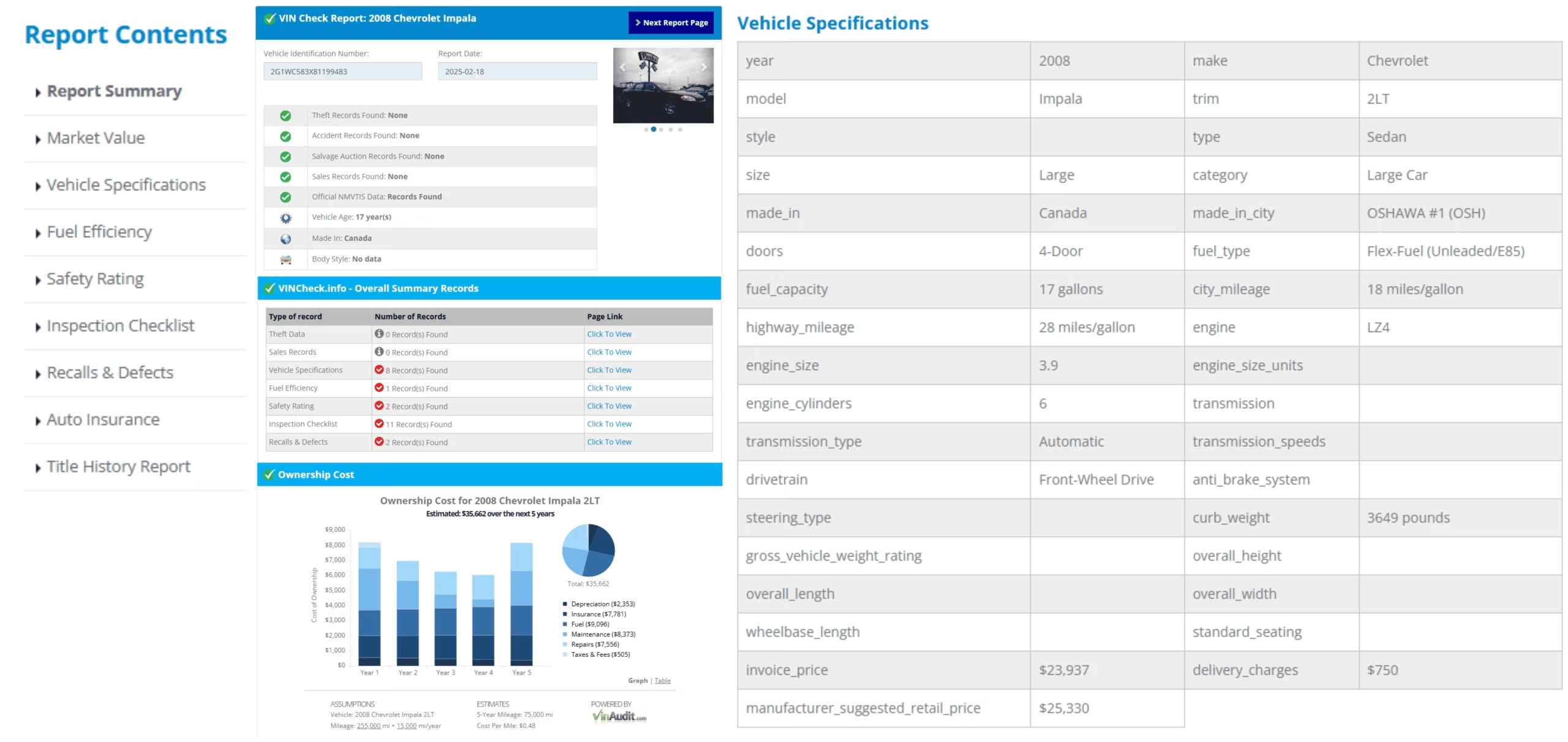
Sample report layout. Available sections vary by vehicle, VIN, reporting history, and source coverage.
Connecticut Plate Lookup, VIN Check, DMV Title Search, and NMVTIS
| Search Type | Best Used For | What It Does Not Confirm |
|---|---|---|
| Connecticut License Plate Lookup | Finding an associated VIN and starting vehicle-history research when the VIN is not shown. | Current owner identity, official registration validity, or completed title transfer. |
| Direct VIN Check | Researching the exact vehicle after confirming the complete VIN on the vehicle and documents. | Every unreported accident, repair, lien, mechanical problem, or ownership dispute. |
| Connecticut DMV Title Search | Requesting the titled owner of record, odometer entries, or ownership history using Form J-23T. | That protected information will be released without the required identification and lawful access. |
| NMVTIS Report | Reviewing state title, brand, odometer, and selected theft information from participating sources. | Every accident, repair, emissions event, or mechanical problem. |
| NHTSA and NICB | Checking open recalls and participating insurer theft or salvage records using the verified VIN. | A complete title, lien, accident, sale, or ownership history. |
Latest Connecticut Vehicle Registration and Traffic-Safety Statistics
FHWA’s standardized 2024 table reports 2,809,456 Connecticut motor vehicles. CTDOT’s January 2026 release reported a preliminary 274 roadway deaths in 2025, down from 312 in 2024. The CTDOT traffic-deaths ticker later showed 97 deaths year-to-date as of June 13, 2026, equal to the same point in 2025 and below 146 in 2024.
| Connecticut Measure | Latest Figure | Source Context |
|---|---|---|
| FHWA all motor vehicles | 2,809,456 | Federal calendar-year 2024 standardized total, published January 2026 |
| FHWA automobiles | 1,028,799 | Private, commercial, taxi, and publicly owned automobiles |
| FHWA buses | 9,889 | Private, commercial, and publicly owned buses |
| FHWA trucks | 1,688,772 | FHWA truck category, including pickups and many SUVs |
| FHWA motorcycles | 81,996 | FHWA motorcycle category |
| Preliminary traffic deaths in 2025 | 274 | CTDOT January 28, 2026 release, down 12% from 2024 |
| 2026 deaths through June 13 | 97 | CTDOT traffic-deaths ticker; preliminary and date-specific |
Sources: FHWA Highway Statistics 2024, Table MV-1, CTDOT 2025 Fatality Release, and CTDOT Traffic Deaths Ticker.
Connecticut Front, Rear, Standard, and Vanity Plate Rules
Front and Rear Plates
Vehicles issued two Connecticut plates must display one at the front and one at the rear.
Single Rear Plate Classes
Motorcycles and many trailers use one rear plate. Trailer plates must be securely mounted, visible, and illuminated.
Current Standard Base
Connecticut continues to use its blue-gradient Constitution State passenger base.
Common AB·12345 Format
The current standard passenger series commonly uses two letters followed by five numerals. Older valid serial formats remain in circulation.
Vanity and Special Plates
Connecticut offers standard vanity plates and environmental, military, college, town, organization, veteran, recreational, and other special designs.
Current Vanity Fee Starts at $70
The standard DMV vanity-plate fee is currently $70, while special-background and contribution plates may cost more.

Connecticut has used several valid serial patterns. The current passenger series commonly follows AB·12345.
Official references: Connecticut Vanity and Special Plates, Connecticut Trailer Plate Requirements, and Connecticut Motor Vehicle Statutes.
Seller Plate Removal, Registration Cancellation, and Plate Transfer
A Connecticut seller should complete the title and bill of sale, remove the plates, cancel the registration, retain the cancellation receipt, and keep liability insurance active until the registration has been canceled.
Complete the Title
Assign the title to the buyer and provide the required bill of sale, including vehicle, buyer, seller, price, date, VIN, and odometer details.
Remove Both Plates
Do not allow the buyer to leave using the seller’s Connecticut plates or registration.
Cancel the Registration
Connecticut allows cancellation online or by mail. Online cancellation is free and produces a plate-disposition receipt.
Keep Insurance Until Cancellation
Ending coverage while the registration remains active can create an insurance-compliance case and registration suspension.
Transfer Qualifying Plates
Connecticut allows eligible plate transfers between vehicles and certain ownership transfers under DMV rules.
Property-Tax Record
Keep the cancellation receipt and bill of sale because the vehicle remains subject to town property-tax assessment until registration is canceled.
Official references: Connecticut DMV: Sell a Vehicle, Cancel Registration and Plates, and Transfer Plates.
Replacing Lost, Stolen, or Damaged Connecticut Plates
Damaged Regular Plates: $25
An eligible damaged regular-plate replacement currently costs $25 through the online service.
Stolen Plates: $5
The lost-or-stolen replacement fee is $5 when an acceptable police report states that the plates were stolen.
Without Police Report: $25
The fee is $25 without the required stolen-plate police report.
Use Form E-159
Lost or stolen plate replacement requires the marker-plate notice, registration, insurance card, identification, and remaining plate when applicable.
Two Replacement Plates
Connecticut generally issues two off-the-shelf replacement plates during the appointment.
Matching Delays
A newly replaced or transferred plate may not immediately match older third-party plate-to-VIN records.
Official reference: Connecticut DMV Plate Replacement.
Connecticut 10-Day Temporary and 30-Day In-Transit Registrations
Connecticut’s temporary-registration periods depend on why the vehicle needs limited operation. A temporary credential is not proof of clean title, lien release, or mechanical condition.
Passenger Temporary Registration: 10 Days
A temporary registration for inspection or emissions currently costs $21 for each 10-day period.
Required Documents
Bring the assigned title, bill of sale, Form H-13B, Connecticut insurance card, identification, and applicable tax payment.
Commercial Temporary Fees
The current 10-day fees are $27 for commercial vehicles up to 6,000 pounds GVWR and $49 above 6,000 pounds.
Thirty-Day In-Transit Registration
An out-of-state resident who buys a vehicle in Connecticut may qualify for a special in-transit registration that expires after 30 calendar days.
Verify the VIN and Dates
Compare the temporary credential, registration, buyer, seller or dealer, VIN, issue date, and expiration date.
Temporary Tags Have Coverage Gaps
Temporary and dealer tags may not match plate-to-VIN databases reliably. Use the physical VIN for the most accurate research.
Official references: Connecticut Temporary Registration and Connecticut In-Transit Registration.
Connecticut Private-Sale Title and Registration Checks
Verify the Seller
Confirm that the seller is the titled or legally authorized owner and that the name matches the title and identification.
Match the VIN
Compare the title VIN with the dashboard, door label, plate result, registration, and vehicle being sold.
Use Form H-13B
The buyer completes the Connecticut Application for Registration and Title with ownership, insurance, lien, and transaction information.
Bill of Sale
Use Form H-31 or a bill of sale containing the vehicle, buyer, seller, price, date, VIN, odometer, and signatures.
Private-Sale Tax
The current rate is 6.35% for vehicles valued at $50,000 or less and 7.75% above $50,000, generally based on the higher of book value or sale price.
Older Non-Titled Vehicles
For vehicles more than 20 model years old, use the prior registration, Form Q-1 when required, and the bill of sale instead of a Connecticut title.
Do not accept a blank, altered, erased, unsigned, or incomplete title. Stop when the seller, VIN, title, lien, or vehicle identity cannot be verified.
Official references: Connecticut Bill of Sale, Connecticut Vehicle Sales Tax, and Proof of Ownership.
Connecticut Vehicle Registration for New Residents
A new Connecticut resident has 90 days after establishing residency to transfer an out-of-state vehicle registration.
Emissions or VIN Verification
Complete the required emissions test or VIN verification before the DMV appointment, based on vehicle age and exemption status.
Original Ownership Document
Connecticut generally requires the original out-of-state title. A lienholder or leasing company may need to send it directly.
Form H-13B
Complete the Connecticut registration and title application with all owners and lienholders listed correctly.
Connecticut Insurance
Obtain a current Connecticut Insurance Identification Card before registration.
Current Registration Components
Passenger registration currently includes a $120 base registration fee, $5 plate fee, $25 title fee, $10 administrative fee, and other applicable charges.
Ninety-Day Deadline
The previous page’s 60-day statement is outdated. Current Connecticut DMV guidance provides 90 days.
Official reference: Transfer an Out-of-State Registration to Connecticut.
Connecticut Title, Lien, and Official Vehicle Record Verification
Match the VIN Everywhere
Compare the dashboard VIN, door label, title, registration, insurance card, plate result, and seller documents.
Review the Lienholder
Require an acceptable lien release before paying when a lienholder appears on the title or vehicle record.
Official Title Search: $20
Form J-23T can request the titled owner of record, odometer entries, or complete ownership history. Certification costs another $20.
Duplicate Title: $25
Connecticut currently charges $25 for a replacement title using Form H-6B.
Twenty-Year Title Exemption
Vehicles more than 20 model years old generally do not require a Connecticut title.
NMVTIS
Use NMVTIS for state title, brand, odometer, and selected theft information from participating sources.
Official reference: Connecticut DMV Title Services.
Current Connecticut Vehicle Title, Registration, Plate, and Record Fees
| Transaction | Current Fee | Important Detail |
|---|---|---|
| Regular passenger registration | $120 | Additional plate, title, administrative, clean-air, parks, lien, and other charges may apply |
| Standard plate fee | $5 | Separate from the registration fee |
| Title | $25 | A lien notation is currently $10 when applicable |
| Administrative fee | $10 | Applies to many registration and title transactions |
| Clean Air Act fee | $15 | Current regular passenger amount |
| Passport to the Parks | $24 | Current three-year noncommercial fee effective July 1, 2025 |
| Emissions exemption | $40 | Applies to qualifying vehicles four model years old or newer |
| Temporary passenger registration | $21 per 10 days | Used when inspection or emissions must be completed before permanent registration |
| Title search or history | $20 | Certification is an additional $20 |
| Salvage inspection | $88 | Required before a qualifying salvage vehicle receives a rebuilt title |
Official references: Connecticut DMV Fees, Temporary Registration Fees, and Salvage Inspection Fees.
Connecticut Auto Insurance Requirements
Connecticut requires continuous liability insurance while a vehicle registration remains active. Cancel or transfer the registration before ending the policy.
$25,000 Per Person
Minimum bodily-injury liability for one injured person.
$50,000 Per Accident
Minimum bodily-injury liability for multiple people injured in one accident.
$25,000 Property Damage
Minimum property-damage liability for one accident.
Insurance Reporting
Insurers report coverage cancellations and lapses to Connecticut DMV.
$200 Lapse Penalty
A lapse longer than 14 days can result in a $200 civil penalty and registration suspension unless continuous coverage is proven.
A Plate Check Is Not Proof
A lookup cannot confirm that a policy is active, applies to the vehicle, or will remain in force after the sale.
Official reference: Connecticut Insurance and Registration Compliance.
Connecticut Emissions Testing and VIN Verification
Most covered Connecticut vehicles follow the state emissions program’s scheduled test cycle. Use the official VIN due-date lookup rather than relying on the plate alone.
Current Test Fee: $20
The Connecticut emissions test currently costs $20 at an authorized test center.
Newer-Vehicle Exemption
Vehicles younger than four model years are exempt and may pay the current $40 emissions-exemption registration fee.
Older-Vehicle Exemption
Model year 2001 and older vehicles are currently exempt from the emissions program.
Other Exemptions
Full electric vehicles, motorcycles, vehicles over 10,000 pounds GVWR, farm vehicles, composite vehicles, and several other classes are exempt.
VIN Verification: $10
An emissions-exempt out-of-state vehicle may require a VIN verification, currently costing $10 at an authorized station.
Inspection Is Not a Warranty
An emissions pass or VIN verification does not confirm structure, brakes, tires, flood damage, repair quality, or future reliability.
Official references: Connecticut Emissions Program and Connecticut VIN Verification Stations.
Connecticut Salvage and Rebuilt Vehicle Risks
A vehicle declared salvage cannot legally be operated on Connecticut roads until it completes the salvage-inspection and rebuilt-title process.
Transport by Flatbed
A private owner cannot drive or tow the salvage vehicle to the inspection. No wheel may touch the ground during transport.
Inspection Fee: $88
The current regular salvage-inspection fee is $88.
Parts Receipts
Bring receipts identifying major components and donor-vehicle VINs when used parts were installed.
Repair Report and Photos
Connecticut requires Form K-186, the original insurance appraisal, and photographs showing damage and repairs.
Airbag Certification
Vehicles equipped with airbags require the applicable Form B-303 certification.
Rebuilt Title
After passing, the new title no longer carries the salvage stamp but is printed with the word Rebuilt.
Official reference: Connecticut Salvaged and Totaled Vehicles.
Connecticut Flood, Coastal Salt, Winter, Pothole, and Deer-Collision Risks
A plate lookup can reveal reported history, but Connecticut’s Long Island Sound coastline, river flooding, snow, road salt, freeze-thaw cycles, potholes, and wildlife exposure make a physical inspection essential.
Coastal and River Flooding
Check carpets, seat tracks, connectors, modules, lights, spare-tire wells, and seams for silt, moisture, mold, or corrosion.
Road Salt and Brine
Inspect brake and fuel lines, frame, subframes, suspension mounts, wheel wells, exhaust, fasteners, and electrical grounds.
Freeze-Thaw and Potholes
Check wheels, tires, alignment, steering, suspension, wheel bearings, underbody, and previous impact repairs.
Snow and Ice Damage
Review bumpers, undertrays, cooling components, exhaust, body seams, sensors, and areas damaged by plows or snowbanks.
Deer and Animal Collisions
Look for repaired front-end structure, cooling-system damage, replaced lamps, restraint deployment, and mismatched paint.
Interstate Title Washing
Review title movement and NMVTIS records when a vehicle moved after a flood, total loss, or insurance claim.
Connecticut Vehicle Theft, VIN Cloning, Plate Swapping, and Title Fraud
A plate result should be treated as an identity check, not proof that the seller legally owns the vehicle. Compare the plate, VIN, title, seller, lien, and registration documents before payment.
Theft and Recovery Records
Review available theft signals, then verify concerns through law enforcement or NICB VINCheck.
VIN Cloning
A stolen vehicle may use a copied VIN, counterfeit label, false title, or plate from a similar legitimate vehicle.
Plate Swapping
A plate attached to the wrong vehicle can create a make, model, year, body, or VIN mismatch.
Temporary-Tag Limitations
Temporary and in-transit credentials may not appear reliably in plate-to-VIN databases. Verify the physical VIN.
Title Washing
Interstate transfers may be used to obscure salvage, flood, junk, rebuilt, or odometer history.
Online-Sale Fraud
Avoid sellers who hide the VIN, refuse an inspection, cannot produce the title, or demand irreversible payment before verification.
Consumer references: NICB VINCheck and NHTSA Recall Lookup.
Connecticut License Plate Owner Lookup and Privacy
VinCheck.info’s Connecticut plate lookup is for vehicle research. It does not reveal a private owner’s name, home address, phone number, driver-license information, or other protected personal data.
Connecticut DMV’s official title search can verify the current titled owner of record and provide additional history when requested through Form J-23T. The process requires identification, fees, and compliance with Connecticut and federal record-access rules.
Use the lookup to research the vehicle, not to identify, locate, contact, follow, or confront a private person.
Official references: Connecticut Title Records and Connecticut DMV Record Forms.
Connecticut Plate and VIN Red Flags
- The lookup returns a different make, model, year, body style, or VIN from the vehicle shown.
- The seller refuses to provide the complete VIN, original title, identification, bill of sale, or lien release.
- The dashboard VIN, door label, title, registration, insurance paperwork, and lookup result do not match.
- The VIN plate appears loose, scratched, repainted, replaced, covered, or altered.
- The title shows salvage, rebuilt, flood, junk, lemon, or odometer branding that was not disclosed.
- The seller leaves Connecticut plates on the sold vehicle or tells the buyer to use the seller’s registration.
- A temporary or in-transit registration is expired, altered, assigned to another vehicle, or unsupported by ownership documents.
- The seller demands a deposit or remote payment before allowing VIN, title, lien, emissions, and vehicle-condition verification.
Stop the transaction when the vehicle identity, title, lien, seller, plate, or VIN cannot be verified.
Connecticut Used-Car Checklist After a Plate Lookup
- Confirm the plate and issuing state. Recheck every character before searching.
- Match the returned VIN. Compare it with every VIN location and document.
- Decode the vehicle. Verify the year, make, model, engine, body, and factory identity.
- Review title brands. Check salvage, rebuilt, flood, junk, theft, and odometer history.
- Check official and national records. Consider Connecticut DMV title history, NMVTIS, NICB, and NHTSA.
- Confirm the seller and lien. Require a transferable title and valid lien release.
- Handle the plates correctly. The seller removes, transfers, or cancels the plates and registration.
- Verify emissions or VIN requirements. Check the official due-date and exemption tools.
- Verify insurance. Confirm active 25/50/25 liability coverage before driving.
- Get an independent inspection. Focus on flood clues, salt corrosion, structure, brakes, tires, cooling, electronics, restraints, and repair quality.
Official Connecticut Vehicle and Plate Resources
Registration and Title
Review Form H-13B, proof of ownership, title exemptions, taxes, insurance, and appointment requirements.
Plate Services
Review transfers, vanity and special plates, replacement plates, and registration cancellation.
Emissions and VIN Verification
Check due dates, exemptions, test locations, fees, VIN verification, late fees, and waiver requirements.
Title Records and Salvage
Review J-23T title searches, title brands, salvage inspections, rebuilt titles, and required documentation.
License Plate Lookup by State
Select the actual issuing state shown on the plate. The same letter and number combination may exist in multiple states.
Connecticut Plate Lookup Limitations
- A plate may not match a VIN when it is new, temporary, transferred, canceled, replaced, expired, removed, reassigned, entered incorrectly, or absent from available sources.
- A result may reflect older plate-to-vehicle data after a recent transfer or replacement. Always compare the returned VIN and vehicle description.
- Not every accident, flood event, repair, lien, title event, theft, mileage entry, emissions event, service visit, or sale is reported to every database.
- A clean report does not guarantee mechanical condition, legal ownership, completed title transfer, insurance coverage, emissions compliance, or freedom from undisclosed damage.
- The report does not replace Connecticut DMV, CTDOT, a lienholder, law enforcement, an insurer, a recall database, an emissions facility, or a qualified mechanic.
Connecticut License Plate Lookup Frequently Asked Questions
What is a Connecticut license plate lookup?
A Connecticut license plate lookup uses the plate number and Connecticut as the issuing state to search for an associated VIN when matching data is available. The VIN can then be used to review available vehicle identity and history information.
Is the Connecticut license plate lookup free?
The VinCheck.info lookup can be started without a fee or account. Results depend on plate-to-VIN matching, reporting history, and source coverage.
Can I search a Connecticut plate without knowing the VIN?
Yes. Enter the complete Connecticut plate number and select Connecticut. When a matching VIN is available, the lookup can continue with VIN-based vehicle research.
What can a free Connecticut license plate check show?
Depending on available data, it may show the associated VIN, vehicle specifications, title brands, theft or salvage signals, accident records, odometer entries, recalls, sales, market value, and other vehicle-history details.
Can a Connecticut plate lookup show the owner’s name or address?
No. VinCheck.info does not display protected owner names, home addresses, phone numbers, driver-license details, or other restricted personal information.
Is a Connecticut reverse license plate lookup legal?
A consumer lookup may be used for lawful vehicle research. Access to protected information in official Connecticut DMV records is restricted by federal and state privacy rules and requires authorization or a permitted purpose.
Is a plate lookup the same as an official Connecticut DMV title search?
No. A consumer plate lookup is designed for vehicle research. Connecticut DMV offers an official title record or history request using Form J-23T, identification, a fee, and its record-access rules.
What should I do if the lookup returns the wrong vehicle?
Stop and verify the plate number, issuing state, physical VIN, title, registration, and seller information. A mismatch may result from a typo, recent plate transfer, stale data, reassignment, or fraud.
What should I do if no VIN is found?
Recheck every plate character and confirm that Connecticut is selected. If no match is available, ask the seller for the complete 17-character VIN and run a direct VIN check.
Does Connecticut require front and rear license plates?
Vehicles issued two plates must display them at the front and rear. Most passenger vehicles receive two plates, while motorcycles and many trailers use one rear plate.
What is the common Connecticut passenger plate format?
The current standard passenger series commonly uses two letters followed by five numerals, displayed as AB·12345. Older valid Connecticut plates may use earlier serial formats.
Do Connecticut plates stay with the seller?
Yes. A seller should remove the plates, cancel the registration, retain the cancellation receipt, and keep liability insurance active until the registration has been canceled or the plates have been properly transferred.
Can Connecticut plates be transferred to another vehicle?
Yes. Connecticut allows qualifying plate transfers between vehicles and certain ownership transfers. Registration charges and the current Passport to the Parks fee may apply.
How much does it cost to replace Connecticut plates?
A damaged regular plate replacement currently costs $25. Lost or stolen plates cost $5 with an acceptable police report or $25 without one. Connecticut generally issues two replacement off-the-shelf plates.
How long is a Connecticut temporary registration valid?
A standard temporary registration used for inspection or emissions is issued in 10-day periods and currently costs $21 for a passenger vehicle. A separate in-transit registration for an out-of-state buyer expires 30 calendar days after issuance.
How long does a new resident have to register a vehicle in Connecticut?
A new resident has 90 days after establishing Connecticut residency to transfer an out-of-state vehicle registration.
Which Connecticut vehicles require a title?
Connecticut generally requires a title for vehicles newer than 20 model years. A vehicle more than 20 model years old is generally non-titled and uses prior registration and ownership-assignment documents instead.
What are Connecticut’s minimum auto insurance limits?
Connecticut requires at least $25,000 per person and $50,000 per accident for bodily injury and $25,000 per accident for property damage.
How much does Connecticut emissions testing cost?
The current Connecticut emissions test fee is $20. Exemptions include vehicles younger than four model years, model year 2001 and older vehicles, full electric vehicles, motorcycles, and several other classes.
Does a Connecticut plate report replace official records or an inspection?
No. Plate-to-VIN matching and vehicle reports depend on available data. Verify the title, registration, lien, seller, insurance, emissions, recalls, and physical condition, and obtain an independent inspection before buying.
Run a Free Connecticut License Plate Lookup
Enter the complete Connecticut plate number, select Connecticut, and verify any returned VIN against the vehicle and documents.
Check a Connecticut PlateVinCheck.info is an independent vehicle information website and is not affiliated with or operated by the Connecticut Department of Motor Vehicles, Connecticut Department of Transportation, Connecticut Emissions Program, a municipality, an insurer, a lienholder, or an inspection facility. A Connecticut license plate lookup is a vehicle-research tool, not an official title, registration, lien, owner-record, insurance, emissions, theft, salvage, or mechanical-inspection service. Results vary by plate, VIN availability, reporting history, and source coverage. Confirm important details with Connecticut DMV, the seller, the lienholder, official documents, relevant agencies, and an independent inspector.